







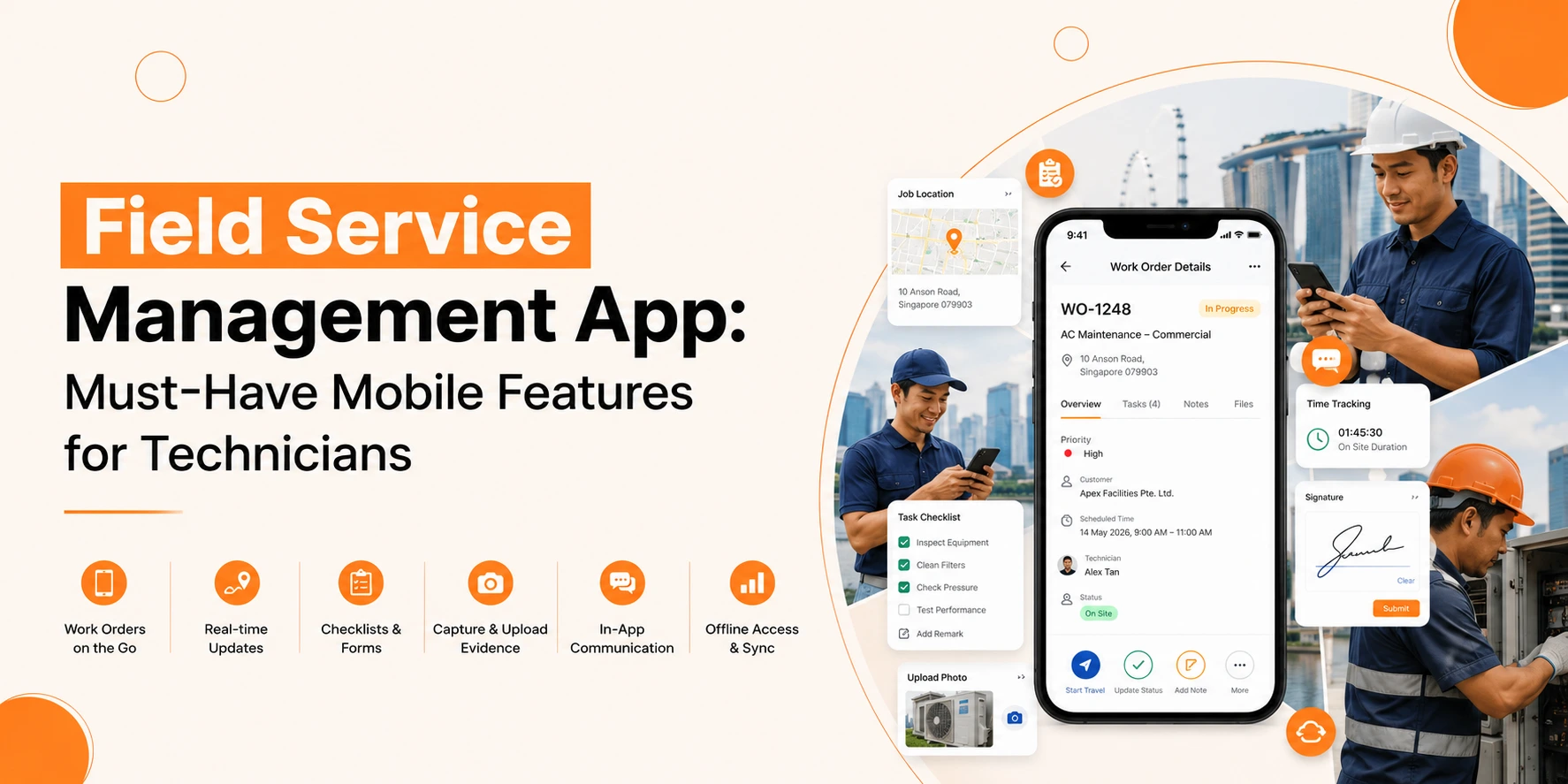
Field teams no longer work with paper forms, phone calls, and manual schedules. Service businesses now rely on mobile tools to keep technicians connected, organised, and informed throughout the day. A modern field service management app helps technicians complete jobs faster, reduce errors, and improve customer service without returning to the office.
From job scheduling to digital invoices, mobile access has changed how field teams operate. Technicians can now receive updates, view job details, capture signatures, and report progress from one device.
But not every app meets the needs of field workers. Some lack offline support. Others fail to give real-time updates or easy navigation. The right solution should make daily work simpler, not harder.
In this guide, we will explore the must-have mobile features every field service team should expect from a reliable field service management mobile app.
Why Mobile Access Matters in Field Service Management
Field technicians spend most of their time away from the office. The workers spend their day travelling between customer sites, job locations, storage facilities and maintenance zones. Operations will experience delays because of missing information and slow communication, which produces negative effects on customer satisfaction.
A mobile-first system solves these issues by giving technicians access to critical data wherever they are.
Businesses can achieve better field service management through the development of strong mobile capabilities.
- Businesses can assign their work tasks to employees at a faster pace.
- Businesses need to reduce their paper usage because this practice enables them to cut their costs and achieve their sustainability targets.
- The system enables technicians to reach customers at the earliest possible time.
- The system provides real-time work monitoring, which allows staff members to observe all operations.
- Users can contact customers at any time through the platform to deliver important information.
- The system leads to higher first-time fix rates for maintenance tasks.
Customers want businesses to speed up their service delivery, while they want to receive straightforward information.
Technicians can use mobile tools to show up ready for work because these devices allow them to finish their tasks without experiencing any pointless delays.
Key Features Every Field Service Management App Should Include
Not all mobile tools support technicians in the same way. The best systems focus on speed, ease of use, and real-time access.
Below are the most important features every business should look for.
Real-Time Job Updates
One of the most valuable features in a field service management mobile app is live job tracking and updates.
Technicians should receive:
- New assignments
- Schedule changes
- Customer notes
- Priority alerts
- Route updates
A strong mobile FSM app for job updates helps field teams respond quickly when plans change during the day.
Without mobile updates, technicians often rely on calls or text messages from dispatchers. This creates confusion and increases delays.
Live updates keep everyone aligned and reduce communication gaps between office staff and field workers.
Why It Matters
Real-time updates help technicians:
- Reach jobs on time
- Avoid missed appointments
- Access the latest customer information
- Reduce repeat visits
For service managers, this feature improves visibility across the workforce.
Also Read: Best Field Service Management App
Offline Access for Remote Work
Field technicians often work in locations with weak internet coverage. Basements, rural sites, construction areas, and large facilities can all affect connectivity.
An offline field service app allows technicians to continue working even without network access.
Technicians should still be able to:
- View job details
- Access customer records
- Complete forms
- Capture signatures
- Add notes and images
Once the connection returns, the app should sync automatically.
Why Offline Support Is Essential
Without offline access, technicians may lose important information or delay updates until they regain service.
This creates:
- incomplete records,
- slower reporting,
- and workflow interruptions.
Offline capability keeps operations running without disruption.
Smart Scheduling and Dispatching
A reliable field service scheduling app should help technicians manage their day without confusion.
Mobile scheduling tools allow technicians to:
- View upcoming jobs
- Check appointment times
- Receive route directions
- See emergency requests
- Track changes instantly
This reduces the need for constant phone communication with dispatch teams.
Better Scheduling Improves Productivity
Technicians work more efficiently when schedules are clear and organised.
Good scheduling features help businesses:
- reduce travel time,
- avoid double bookings,
- improve punctuality,
- and increase completed jobs per day.
For busy field teams, scheduling accuracy has a direct impact on customer experience.
GPS and Route Navigation
Travel takes up a large part of a technician’s day. A mobile app with built-in navigation helps reduce wasted time on the road.
GPS tools can help technicians:
- find customer locations,
- avoid traffic delays,
- and optimise travel routes.
Managers can also track technician movement and job progress in real time.
Benefits of GPS Features
GPS support improves:
- arrival times,
- scheduling accuracy,
- fuel efficiency,
- and overall productivity.
Customers also appreciate accurate arrival estimates and better communication.
Digital Work Orders and Forms
Paper forms slow down field operations. They also increase the risk of missing or damaged records.
A modern field service management mobile app should allow technicians to complete all forms digitally.
This includes:
- work orders,
- inspection reports,
- checklists,
- safety forms,
- and service confirmations.
Digital records are easier to store, search, and share.
Why Digital Forms Matter
Digital forms improve accuracy and reduce paperwork.
Technicians can:
- complete tasks faster,
- upload information instantly,
- and reduce manual errors.
Office teams also gain faster access to completed reports.
Photo and Video Uploads
Visual proof helps technicians explain completed work and document service conditions.
A mobile app should allow users to:
- capture site photos,
- upload videos,
- attach images to reports,
- and share files with office teams.
This feature supports better communication between technicians, managers, and customers.
Common Uses for Media Uploads
Technicians often use photos to:
- show equipment damage,
- confirm completed repairs,
- document safety concerns,
- or provide installation proof.
Images also help reduce disputes and improve service transparency.
Customer Information Access
Technicians need quick access to customer records before arriving on site.
A strong field service mobile app should provide:
- customer contact details,
- service history,
- equipment records,
- previous notes,
- and warranty information.
Having this data available helps technicians arrive prepared.
Better Information Leads to Better Service
When technicians understand the customer’s history, they can:
- diagnose issues faster,
- avoid repeated questions,
- and deliver more personalised service.
Customers notice when technicians arrive informed and ready.
Inventory and Parts Tracking
Field technicians often need tools, equipment, or replacement parts to complete jobs.
A mobile app with inventory tracking helps technicians:
- check stock levels,
- confirm part availability,
- request replacements,
- and record used items.
This prevents delays caused by missing parts.
Why Inventory Visibility Matters
Without inventory access, technicians may:
- arrive without the correct equipment,
- delay repairs,
- or schedule return visits.
Real-time inventory tracking improves first-time fix rates and reduces downtime.
Mobile Invoicing and Payments
Many businesses now complete billing directly in the field.
A field service management app should support:
- digital invoices,
- payment collection,
- service summaries,
- and customer signatures.
This speeds up payment cycles and reduces paperwork.
Faster Payments Improve Cash Flow
Technicians can generate invoices immediately after completing a job.
Customers benefit from:
- quicker transactions,
- digital receipts,
- and transparent billing.
Businesses also reduce delays caused by manual invoicing processes.
Push Notifications and Alerts
Technicians work in fast-moving environments. Mobile alerts help them stay informed throughout the day.
Notifications can include:
- new assignments,
- urgent schedule changes,
- customer cancellations,
- and safety updates.
This feature keeps technicians connected without constant calls from dispatchers.
Why Alerts Improve Operations
Push notifications help technicians react quickly to changes and avoid missing information.
This improves:
- communication,
- scheduling flexibility,
- and response times.
Technician-Friendly Interface
Field workers need tools that are easy to use under pressure.
Complicated systems slow down work and increase frustration.
The best technician mobile app features focus on:
- simple navigation,
- fast loading times,
- clear layouts,
- and minimal steps.
Technicians should complete tasks quickly without searching through menus.
Ease of Use Affects Adoption
If an app feels difficult or confusing, technicians may avoid using it properly.
A clean interface improves:
- user adoption,
- training speed,
- and overall productivity.
Simple design matters just as much as advanced functionality.
Time Tracking and Job Status Updates
Technicians should be able to update job progress directly from their mobile device.
Status updates may include:
- job started,
- work paused,
- waiting for parts,
- or job completed.
Time tracking also helps businesses monitor labour hours and workload distribution.
Better Visibility for Managers
Live job status updates help managers:
- track progress,
- identify delays,
- and improve scheduling decisions.
Customers also receive more accurate service updates.
Safety and Compliance Features
Field service work often involves safety checks and compliance reporting.
Mobile apps should support:
- digital safety forms,
- inspection records,
- compliance checklists,
- and incident reporting.
This helps businesses maintain consistent safety standards across teams.
Why Safety Tracking Matters
Digital records improve accountability and simplify audits.
Technicians can complete required documentation directly on site without carrying paper forms.
Also Read: FSM Mobile Apps: Why They Matter & What to Look For
What Makes the Best Field Service Management App for Technicians?
The best field service management app for technicians should support daily work without creating extra complexity.
Technicians need tools that are:
- fast,
- reliable,
- easy to use,
- and available anywhere.
The most effective apps combine:
- offline access,
- scheduling,
- customer records,
- job updates,
- and invoicing into one platform.
Businesses should focus on features that improve technician efficiency and customer experience rather than unnecessary complexity.
How Mobile Apps Improve Customer Satisfaction
Customers expect fast communication and reliable service.
Mobile tools help technicians:
- arrive prepared,
- provide accurate updates,
- complete work faster,
- and resolve issues during the first visit.
This creates a smoother customer experience from start to finish.
A strong field service management mobile app also improves communication between office teams and technicians, which reduces scheduling errors and missed appointments.
The system operates to produce an unbroken customer experience which extends across all service delivery stages. A powerful field service management mobile application enables better communication between office personnel and field technicians, which leads to fewer scheduling mistakes and missed service visits.
Satisfied customers are more likely to:
- return,
- leave positive reviews,
- and recommend the business to others.
Final Thoughts
Overall, Service businesses need a modern field service management application because it enables them to operate at higher speeds while their technicians achieve better results and their customers receive enhanced service experiences.
Technicians can access their work assignments through mobile devices, which enable them to update their records and maintain team communication while performing their duties from anywhere they choose.
Features like:
- offline access,
- real-time job updates,
- GPS tracking,
- digital forms,
- inventory visibility,
- and mobile invoicing
Organisations can achieve shorter waiting times through their selection of appropriate field service mobile apps, which simultaneously boost their communication systems and enable technicians to finish more tasks by reducing their physical work requirements.
Also, organisations that allocate budget for field service management mobile apps will achieve better service delivery to customers who need quick service and dependable service throughout each day.