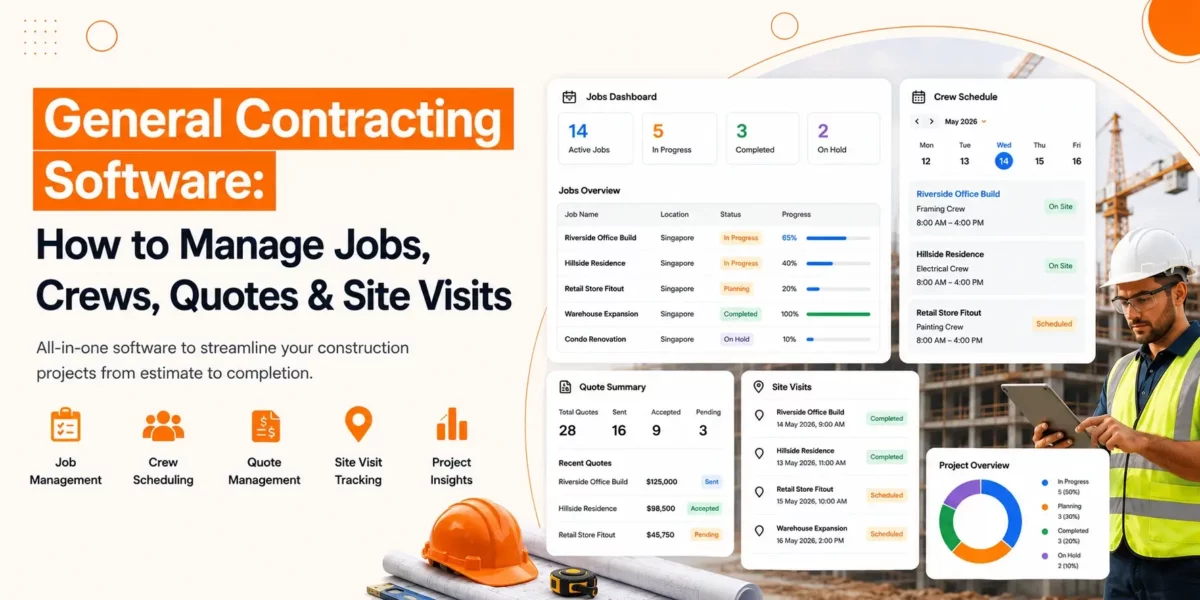
General Contracting Software: How to Manage Jobs, Crews, Quotes & Site Visits

General contracting software helps contractors manage projects, crews, quotes, schedules, and site visits from one place. It keeps daily operations organised, improves communication, reduces manual work, and helps construction businesses complete jobs more efficiently and on time.

Running a contracting business means keeping many moving parts under control. One day, you are preparing quotes for new clients. Next, you are assigning crews, visiting job sites, checking progress, and making sure projects stay on schedule.

When information is scattered across notebooks, spreadsheets, phone calls, and text messages, it becomes harder to keep everything organised.

In this guide, you’ll learn what general contracting software is, why it matters, and how it helps you manage jobs, crews, quotes, and site visits more effectively.

What Is General Contracting Software?

General contracting software is a system that helps contractors manage projects, create quotes, schedule jobs, organise crews, and track site visits from one place. It simplifies daily operations, improves communication, and helps construction businesses complete projects more efficiently.

It can support tasks such as:

  • Managing ongoing projects
  • Creating customer quotes
  • Scheduling work
  • Assigning crews
  • Tracking job progress
  • Recording site visits
  • Managing project documents
  • Monitoring labour hours

Businesses choose to operate their main business activities through their established data processing center. Team members can access project details at their designated locations while managers track progress and clients receive timely updates.

Small business owners who operate with limited staff need general contracting software to handle their administrative responsibilities. The system, which operates as a basic framework, allows business owners to spend less time on documentation while they dedicate their efforts to producing excellent work.

Why Contractors Need Better Job Management

Contractors need better job management to keep projects organised, reduce delays, improve communication, control costs, and make sure every job is completed on time. A structured process also helps teams respond quickly when schedules or project requirements change.

Without a clear process, small issues can become expensive problems.

Better job management helps contractors:

  • Keep projects on schedule
  • Improve communication between office staff and field teams
  • Reduce missed appointments
  • Track labour and project costs
  • Respond to clients faster
  • Reduce paperwork
  • Improve overall productivity

Construction scheduling software allows contractors to manage their work activities across multiple projects while preventing scheduling conflicts between different assignments.

Clear schedules help people understand their specific locations, while they also understand their assigned work responsibilities.

How to Manage Jobs from Start to Finish

To manage jobs from start to finish, contractors should organise project information, create clear schedules, monitor progress regularly, communicate with crews, and review each stage before moving to the next. This helps projects stay on track from planning to completion.

Organise Every Project from Day One

Create a dedicated record for every project. Include details such as:

  • Client information
  • Site address
  • Scope of work
  • Important dates
  • Documents
  • Permits
  • Progress updates

Keeping everything together makes it easier to find information whenever it is needed.

Build Clear Project Timelines

Every project should have planned milestones. Break larger projects into smaller tasks with realistic completion dates.

This approach allows contractors to monitor progress and identify delays before they become serious problems.

Many businesses use construction scheduling software to keep these timelines organised and adjust schedules when unexpected changes occur.

Keep Teams Updated

Projects move faster when everyone has access to the latest information. Regular updates help crews understand:

  • Daily priorities
  • Schedule changes
  • Material deliveries
  • Safety requirements
  • Customer requests

Clear communication reduces mistakes and unnecessary delays.

Track Progress Regularly

Waiting until the end of a project to review progress often creates surprises. Instead, monitor work throughout the project. Regular progress checks help identify:

  • Delayed tasks
  • Resource shortages
  • Budget concerns
  • Quality issues

Early action helps projects stay on track.

How to Create Accurate Quotes Faster

Contractors can create accurate quotes faster by using standard pricing, preparing reusable quote templates, including all project costs, and reviewing estimates before sending them to clients. This saves time while reducing pricing errors.

Use Standard Pricing

Maintain an up-to-date list of labour rates, material costs, and common services. This saves time while keeping pricing consistent across every project.

Create Repeatable Quote Templates

Many projects follow similar patterns.

Using standard templates allows contractors to prepare estimates more quickly while maintaining accuracy.

Templates also ensure that important information is not forgotten.

Include Every Cost

Accurate quotes should cover:

  • Labour
  • Materials
  • Equipment
  • Travel
  • Permits
  • Contingency costs

Leaving out small expenses can reduce profit over time.

Review Before Sending

Take a few minutes to review every quote before sharing it with the client. Check measurements, pricing, and project details carefully. Small errors are much easier to fix before work begins.

How to Manage Crew for Better Resource Management

To manage crews effectively, contractors should assign the right workers to each job, balance workloads, monitor attendance, plan schedules carefully, and adjust resources when project needs change. Better crew management improves productivity and reduces downtime.

Assign the Right People to the Right Jobs

Every crew member has different skills and experience. Match workers with projects that suit their expertise. This improves quality while reducing delays.

Many businesses use contractor workforce management software to organise teams and monitor availability.

Balance Workloads

Avoid assigning too much work to one crew while another team has spare capacity. Balanced workloads improve efficiency and reduce worker fatigue.

Track Attendance and Working Hours

Knowing who is on site helps managers make better decisions throughout the day.

Many crew dispatch and tracking tools provide clear visibility of workforce activity without relying on manual records. Accurate attendance records also simplify payroll and project costing.

Improve Crew Scheduling

Scheduling becomes more difficult as projects increase. Using contractor job scheduling software allows contractors to organise work based on:

  • Worker availability
  • Skills
  • Job location
  • Project priority

This helps reduce scheduling conflicts while making better use of available resources.

Respond Quickly to Changes

Construction projects tend to deviate from their original plans during the building process. Managers need to adjust their crew assignments when projects experience delays because they must prevent any harm to other ongoing projects. The system allows projects to continue their work because it offers adaptable solutions that handle unplanned obstacles.

How to Manage Site Visits More Effectively

Contractors can manage site visits more effectively by planning inspections in advance, recording progress during every visit, taking photos, documenting issues, and sharing updates with the team. Regular site visits help maintain quality and keep projects moving smoothly.

Plan Visits in Advance

Create a schedule for regular site inspections. Avoid waiting until problems appear. Regular visits make it easier to maintain quality throughout the project.

Many contractors also combine this process with contractor dispatch software to organise travel between multiple job sites more efficiently.

Record Findings During Every Visit

Each visit should include notes about:

  • Completed work
  • Outstanding tasks
  • Safety observations
  • Material requirements
  • Client feedback

Keeping detailed records creates a clear history of every project.

Take Photos

Photographs provide valuable evidence of work completed. They also help explain progress to clients and support future project reviews.

Share Updates with the Team

After every site visit, communicate important findings with office staff and field crews. Quick updates reduce confusion and allow issues to be resolved sooner.

Improve Daily Planning

When contractors manage several projects at once, travel time becomes an important factor.

Using contractor dispatch software alongside organised schedules helps reduce unnecessary travel and improve response times.

Many teams also rely on crew dispatch and tracking tools to understand where workers are throughout the day and make informed scheduling decisions.

Choosing the Right Solution

Every contracting business works differently, so there is no single approach that suits everyone.

When comparing options, look for features that help you:

  • Manage projects in one place
  • Schedule jobs and crews
  • Create accurate quotes
  • Track project progress
  • Record site visits
  • Store important documents
  • Improve communication
  • Monitor workforce activity

If you run a growing business, choosing general contracting software for small contractors with room to expand can help support future growth without changing your entire workflow later.

Conclusion

Overall, Construction project management includes multiple responsibilities that extend beyond the actual work performed at the construction site. The process of construction management requires contractors to handle multiple tasks, which include job coordination, quote preparation, crew scheduling, progress tracking, site inspections, and client communication throughout the entire process.

The right general contracting software enables users to combine multiple tasks into a single, organised workflow system. The system creates better communication between team members while enabling them to develop improved plans, and contractors receive full control of every project stage.

A well-structured system will help you decrease project delays while boosting operational efficiency, which leads to enhanced customer service for your business and its customers.
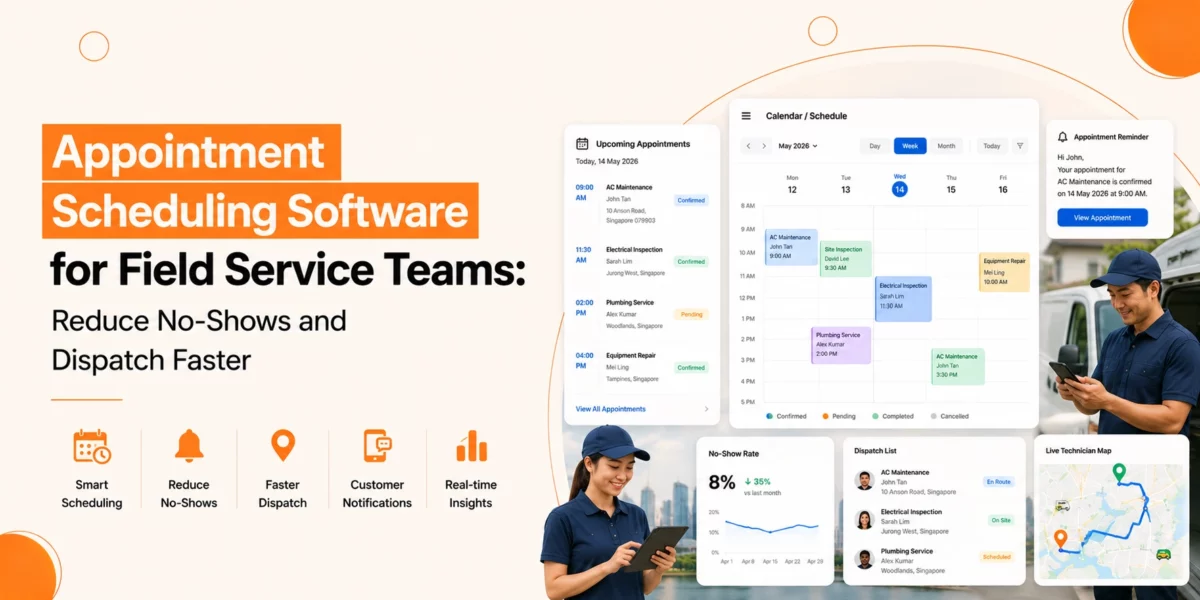
Appointment Scheduling Software for Field Service Teams: Reduce No-Shows and Dispatch Faster

Appointment scheduling software helps field service businesses reduce no-shows, improve technician scheduling, and dispatch teams faster. By automating bookings, sending appointment reminders, and providing real-time schedule visibility, businesses can improve productivity and deliver a better customer experience.

A modern scheduling solution helps businesses organise bookings, manage technician availability, reduce missed appointments, and improve dispatch speed. Whether you run a plumbing, electrical, HVAC, cleaning, or maintenance business, the right system can help your team stay on track.

In this guide, we’ll look at how appointment scheduling software works, why it matters, and the key features to consider.

Why Scheduling Is a Challenge for Field Service Teams

Service providers encounter multiple challenges during their process of booking field service appointments.

Organisations face multiple obstacles when they perform their field service scheduling through manual work, and their systems operate independently from each other while using obsolete software tools. The existing problems between these systems create appointment scheduling errors, which result in scheduling conflicts, delayed customer communication, and unresponsive service delivery.

The process of scheduling encounters various common obstacles that users face during their operational work.

  • The system shows two different customers who have scheduled appointments at the same time.
  • Emergency appointments get canceled at the last possible moment.
  • The scheduled appointment time does not match the actual time when patients arrive for their appointments.
  • The office staff members fail to establish proper communication with technicians who work in the field.
  • The dispatch process continues to encounter obstacles that prevent technicians from reaching their designated locations.
  • The system does not provide enough information about when technicians will be available for work.
  • These problems create two major problems that affect both customer contentment and

What Is Appointment Scheduling Software?

Appointment scheduling software is a digital tool that helps businesses manage bookings, technician schedules, customer appointments, and dispatch operations from one place.

It allows office staff, dispatchers, technicians, and customers to access appointment information in real time. Instead of manually updating schedules, the software automatically tracks bookings, availability, and appointment changes. For field service businesses, this means:

  • Faster appointment booking
  • Better technician allocation
  • Improved customer communication
  • Fewer scheduling mistakes
  • Quicker response times

Many businesses use appointment scheduling software for field service operations because it helps coordinate teams that work across multiple locations each day.

How Appointment Scheduling Software Helps Reduce No-Shows

Appointment scheduling software helps reduce no-shows by sending automated reminders, improving communication, and allowing customers to reschedule appointments easily.

Missed appointments cost money. When a technician arrives and the customer is unavailable, valuable time and resources are wasted. Let’s look at how scheduling software can help.

Automated Appointment Reminders

Service businesses establish automated reminder systems that help them reduce their no-show rates through this method. The system sends customers appointment reminders that help them stay aware of their scheduled meetings. The content of reminders consists of the following elements:

  • Appointment date
  • Appointment time
  • Technician arrival window
  • Service details

This reduces the chance of customers forgetting their booking.

Easy Rescheduling Options

Sometimes customers need to change their appointment. Without a simple process, they may cancel at the last minute or fail to attend. An online appointment booking system allows customers to reschedule appointments without lengthy phone calls.

This helps businesses keep schedules full while giving customers more flexibility.

Better Customer Communication

Customers like to know what is happening. Appointment scheduling tools can provide updates such as:

  • Booking confirmations
  • Schedule changes
  • Technician arrival notifications

Clear communication helps build trust and reduces missed appointments.

What are the Benefits of an Online Appointment Booking System

An online appointment booking system allows customers to schedule appointments at any time while reducing administrative work for staff.

People now want to book their appointments through digital platforms instead of traditional methods. Customers can schedule appointments through an online booking system that operates independently of office staff assistance. The system creates an improved experience which benefits both customers and their staff members.

24/7 Booking Access

Customers can book appointments:

  • During evenings
  • At weekends
  • Outside business hours

This can increase booking opportunities and reduce missed enquiries.

Reduced Administrative Work

Office staff spend less time:

  • Answering scheduling calls
  • Updating calendars
  • Confirming appointments

The system handles much of the process automatically.

Improved Booking Accuracy

Manual booking errors can lead to confusion. An appointment booking system helps ensure that appointment details are recorded correctly and shared with the right people. This reduces mistakes and scheduling conflicts.

What are the Key Features to Look for in Appointment Scheduling Software

The best scheduling software should include scheduling, communication, mobile access, reporting, and customer self-booking capabilities.

Not every solution offers the same functionality. When evaluating scheduling software, consider the following features.

Calendar Management

A clear calendar view should allow users to:

  • Create appointments
  • Move appointments
  • View technician schedules
  • Identify available time slots

Easy calendar management helps teams stay organised.

Customer Self-Booking

Self-service booking is becoming an important feature. A strong online appointment booking system should allow customers to:

  • Book appointments
  • Change appointments
  • Cancel appointments
  • Receive confirmations

This improves convenience and reduces administrative workload.

Automated Notifications

Automated communication helps keep customers informed. Look for systems that support:

  • Booking confirmations
  • Appointment reminders
  • Arrival notifications
  • Schedule updates

These features help reduce no-shows in service business environments.

Mobile Access for Technicians

Field staff need information while they are on the move. Mobile access allows technicians to:

  • View appointments
  • Update job status
  • Access customer details
  • Receive schedule changes

This improves communication between office teams and field workers.

Reporting and Performance Tracking

Good reporting helps businesses identify trends and improve operations. Useful reports may include:

  • Appointment completion rates
  • Cancellation rates
  • Technician utilisation
  • Customer response times

These insights support better decision-making.

Why SMEs Are Adopting Appointment Scheduling Software

Small and medium-sized businesses use appointment scheduling software to improve efficiency, reduce manual work, and deliver better customer service.

Benefits include:

  • Better use of technician time
  • Fewer missed appointments
  • Improved customer service
  • Reduced administrative workload
  • More efficient dispatching

Small businesses can improve operations without adding extra staff.

How to Choose the Right Field Service Appointment Booking Tool?

The right field service appointment booking tool should match your business size, scheduling needs, customer expectations, and growth plans.

Before selecting a solution, consider your business needs. Ask yourself:

  • How many technicians do we manage?
  • Do customers need self-service booking?
  • Do we struggle with no-shows?
  • Do we need mobile access for field teams?
  • Do we require reporting and performance tracking?

The right field service booking tool should support both current operations and future growth. It should simplify scheduling rather than add complexity.

Final Thoughts

Scheduling serves as the most important function which determines how well field service operations will perform. The combination of delayed work, unfulfilled appointments, and broken communication channels leads to reduced operational output and decreased customer happiness.

Businesses can handle their appointment through modern Appointment Scheduling Software that enables them to book appointments while improving their technician distribution and customer interaction methods. Businesses running efficient appointment systems achieve better operational performance because they can send technicians to their destinations quickly and provide their customers with enhanced service quality.

Service companies that want to expand their business should select the right online appointment system because it enables them to boost their operational efficiency, increase their appointment attendance rates, and achieve sustainable business growth.

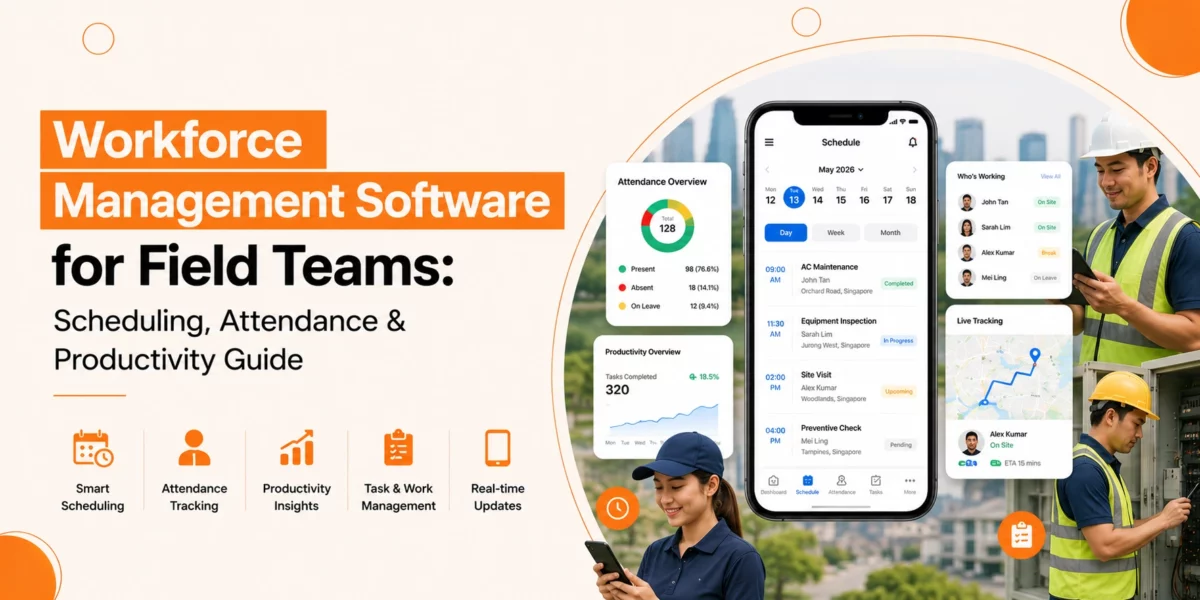
Workforce Management Software for Field Teams: Scheduling, Attendance & Productivity Guide

Workforce Management Software helps field teams improve scheduling, attendance tracking, communication, and productivity. It gives managers real-time visibility into field operations while helping workers stay organised and efficient.

Field teams form the backbone of many industries. Construction crews, maintenance technicians, delivery drivers, healthcare workers, and utility repair teams all operate away from the central office. These workers need clear instructions, fair schedules, and a simple way to report their time. Without the right systems, managers waste hours on phone calls, text messages, and manual data entry just to figure out who is working where.

This is where a Workforce Management system becomes essential. A good system brings order to the chaos of field operations. It gives managers real-time visibility and gives field workers a reliable tool to do their jobs well.

What Makes Field Teams Different from Office Workers

Field teams face problems that desk workers never encounter. An office employee clocks in at a fixed terminal. A field worker might start the day at a warehouse, drive to three different customer sites, and finish at a remote location. Tracking that movement requires more than a basic time clock.

Field workers also deal with variable conditions. Traffic delays, weather problems, equipment breakdowns, and last-minute customer cancellations all affect the daily schedule. A static plan made in the morning rarely survives until the afternoon. Managers need Workforce Management solutions that handle change without falling apart.

Another difference involves communication. Office workers have email, instant messaging, and face-to-face conversations. Field workers need a mobile Workforce Management system that works on phones or tablets. They need to see schedule updates while driving between jobs. They need to report problems without driving back to the office.

What Makes Scheduling and Attendance So Painful for Mobile Teams?

Scheduling and attendance become difficult for mobile teams because employees work in different locations, schedules change frequently, and managers often lack real-time visibility into field activities.

Scheduling That Falls Apart Quickly

Manual scheduling for field teams takes hours. You must match worker skills to job requirements. You must consider travel time between locations. You must respect shift limits and break rules. A single last-minute change can break the entire plan.

Without proper tools, managers use whiteboards or spreadsheets. These methods cannot handle real-time updates. When a worker calls in sick, the manager must scramble to find a replacement and notify every affected customer. This reactive approach wastes time and creates poor customer experiences.

Attendance Tracking That Lacks Accuracy

Field employees cannot use a fixed time clock. Some organisations rely on workers to write down their hours. Others use phone calls to verify start and end times. These methods invite errors and intentional dishonesty.

Manual attendance tracking for field employees also creates payroll problems. Illegible handwriting, forgotten breaks, and disputed hours lead to incorrect paychecks. Fixing these mistakes takes more manager time and damages trust between workers and the company.

Productivity That Remains Invisible

You cannot improve what you cannot measure. Many field service organisations have no reliable data on how long jobs actually take. They do not know which workers complete tasks faster or which routes cause delays. This lack of information makes it impossible to improve field Workforce productivity.

Managers end up guessing about job durations, staffing levels, and training needs. Some workers may struggle without support. Others may finish early and waste time. Without data, every worker looks the same from a distance.

What Features Should You Look For in Software Built for Field Teams?

The best workforce management software includes mobile scheduling, attendance tracking, GPS visibility, offline functionality, digital reporting, and compliance management tools.

Mobile-First Scheduling and Dispatch

Field workers need schedule information on their phones. A good system sends assignments directly to each worker’s mobile device. The worker sees the job address, required tools, customer contact details, and any special instructions. This eliminates the need for paper printouts or morning meetings to hand out assignments.

The system should allow real-time updates. When a job finishes early or a new urgent request comes in, the dispatcher can reassign work with a few clicks. The affected worker receives an instant notification. This agility keeps everyone productive even when plans change.

Mobile Workforce scheduling tools also help with route optimisation. The software considers job locations and travel times to create efficient sequences. This reduces fuel costs and allows workers to complete more jobs each day.

Real-Time Attendance and Location Tracking

Modern attendance tracking for field employees uses mobile technology. Workers clock in when they arrive at a job site using their phone. The software can capture the location and time stamp. This provides proof of attendance without requiring a physical time clock.

GPS functionality serves multiple purposes. It confirms that workers are at assigned locations. It helps dispatchers find the nearest available worker for emergency jobs. It also provides evidence if a customer disputes the arrival time.

Good systems respect privacy. Location tracking should only operate during work hours. Workers should know when their location is being monitored. Transparency builds trust while still providing the data needed to manage operations.

Offline Capabilities for Remote Areas

Field workers often travel to locations without reliable internet. A good Workforce Management Software for field teams must work offline. Workers should clock in, view schedules, and record job details even without a signal.

The software saves all data on the device. When the worker returns to coverage, the system syncs automatically. This prevents data loss and keeps payroll accurate. Without offline capabilities, workers in remote areas cannot use the system reliably.

Digital Job Reporting and Proof of Completion

Paper job tickets get lost, damaged, or filled out illegibly. Digital forms solve these problems. Workers complete job reports on their phones, capturing signatures, photos, and notes. Everything goes directly into the central system.

The digital record system tracks customer disputes which helps to manage the resolution process. The client can prove their work was finished through photographic proof and their signature which they provided electronically. The system delivers faster invoice processing because it automatically transfers billing details from the finished work report into the billing system.

Automated Compliance Checks

Field teams encounter numerous compliance rules that they must follow. Drivers need valid licences. Technicians need current certifications. Employers need to perform safety training and background checks for their workers. The system reaches its limits because it requires human oversight to track mobile team member credentials.

Workforce Management solutions track certification status while they send notifications when expiration dates approach. The system prevents workers from receiving assignments which need expired certification credentials. The system safeguards your organisation against legal problems and safety breaches that might occur in the future.

How Do You Pick the Right Software Without Wasting Money?

Businesses should choose management software based on their operational challenges, mobile usability, integration capabilities, and field-specific requirements.

Assess Your Specific Field Operations

List the problems that cost you the most time and money. Do you struggle with knowing where workers are during the day? Do customers complain about missed arrival windows? Do payroll errors happen every week? Your biggest pain points should guide your feature priorities.

Consider your industry’s unique needs. A construction crew needs different tools than a home healthcare provider. Construction might focus on equipment tracking and safety compliance. Healthcare might prioritise visit duration and patient signatures. Match the software to your actual work.

Test Mobile Experience First

Field workers will reject software that is hard to use. Before committing to any system, test the mobile app with actual workers. Ask them to clock in, view a schedule, and complete a mock job report. If they struggle or complain, keep looking.

The mobile interface should work on various screen sizes. Some workers use the latest iPhone. Others have older Android phones. The software should function well across all common devices without requiring expensive hardware upgrades.

Verify Offline Functionality

Take the software offline during your test. Turn on airplane mode and try to use all core features. Can workers still clock in? Can they view their assigned jobs? Does the system save data for later sync? Many products fail this test, which makes them useless for remote field teams.

Ask specific questions about how offline data syncs. Does the system handle conflicts well? If a worker records two different clock-out times while offline, which one gets saved? Understanding these details prevents headaches later.

Check Integration with Payroll and Accounting

Time tracking data must flow into payroll. Job completion data must flow into invoicing. Your Workforce Management System should integrate with your existing financial systems. Without integration, you will spend hours moving data between systems manually.

Ask about the integration process. Does the software connect directly to common payroll providers? Do you need a custom setup from a developer? Clear answers to these questions prevent unexpected costs and delays.

Best Practices for Implementing Field Workforce Software

Successful implementation requires employee training, phased deployment, and continuous process improvement based on real-world feedback.

Train Before Going Live

Do not hand phones to workers and expect them to figure out the system. Run training sessions for all field staff. Show them how to clock in, view schedules, report problems, and complete job forms. Let them practice with dummy data before the real launch.

Assign a few tech-savvy workers as internal helpers. These people can answer basic questions from coworkers. Having internal support reduces frustration and speeds up adoption.

Phase the Rollout

Launch the new system with a small group first. Choose a team or region that deals with average complexity. Run them on the software for two weeks while keeping the old system as a backup. Fix problems before expanding to everyone.

This phased approach reduces risk. If the software has bugs or missing features, you discover them with a limited group. The cost of a failed pilot is much lower than a failed organisation-wide launch.

Review Data and Adjust Processes

After implementation, look at the data your new system produces. Are jobs taking longer than expected? Do certain workers have unexplained gaps in their day? Use this information to improve operations.

Be prepared to change your processes. Field workers may find better ways to use the software than you imagined. Listen to their feedback and adjust schedules, job forms, or reporting rules accordingly. The goal is better results, not rigid adherence to the original plan.

How Do You Know If Your Investment Is Actually Paying Off?

Businesses can measure success by tracking productivity, payroll accuracy, travel time, job completion rates, and customer satisfaction.

Once you have Workforce Management Software for field teams running, track these key numbers to measure improvement.

First-time fix rate shows how often workers solve problems in one visit. Higher rates mean less wasted travel time and happier customers. Travel time between jobs reveals inefficient routes or scheduling problems. Overtime hours indicate if workloads are balanced fairly or if some workers carry too much. Job completion time compared to estimates shows where training or process changes are needed.

Payroll accuracy is another important metric. Count how many times you need to adjust employee paychecks due to missing or incorrect time data. A good system should reduce these errors by 80 percent or more.

Customer satisfaction scores often improve with better field management. When workers arrive on time and complete jobs efficiently, clients notice. Track your Net Promoter Score or similar metrics before and after implementation.

Conclusion

Overall, Workforce Management Software enables field teams to enhance their scheduling operations, attendance monitoring, productivity tracking, and customer service delivery by reducing administrative responsibilities and operational complexity.

Field team management requires more complicated approaches than office management systems. Mobile work creates unpredictable situations that lead to different levels of organisational chaos. The proper Workforce Software will decrease workplace confusion to its lowest possible level.

The system provides users with superior visibility and control, along with data access that surpasses what they can obtain through manual processes. The investment returns its value through decreased fuel expenses, improved payroll accuracy, increased daily work output and enhanced customer loyalty.

At Genic Teams, we offer workforce management tools that help your organisations simplify scheduling, track attendance accurately, manage your field activities in real time, and support better operational decision-making.

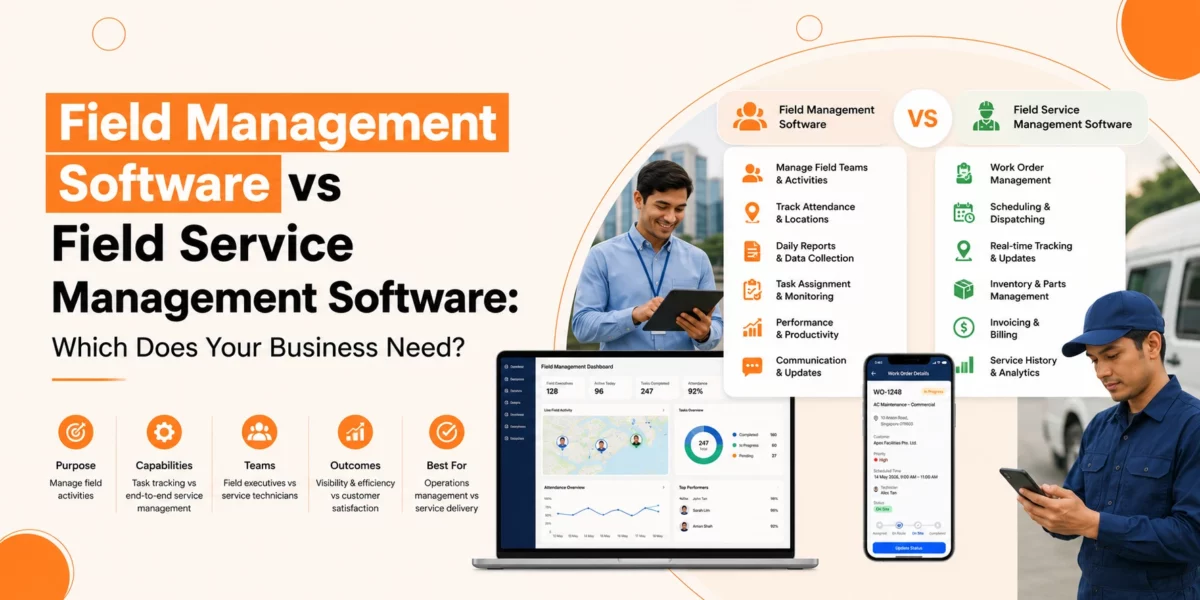
Field Management Software vs Field Service Management Software: Which Does Your Business Need?

Field management software helps businesses schedule teams, manage resources, track tasks, and improve operational efficiency across field activities.

Running field operations well is key for businesses that send teams out of the office. Whether your teams fix, install, check, or deliver, using the right software can shape how work gets done.

Two common tools are field management and field service management software. They may look alike at first, but knowing their differences helps you pick the one that fits your business.

In this guide, we break down the differences, compare features, and help you decide which field software is right for your business.

Understanding Field Management Software

Field management software manages customer-facing field work, combining scheduling, dispatching, service tracking, invoicing, and customer management tools.

Key Features of Field Management Software

  • Task and Workforce Scheduling: Assign jobs and watch who handles what and when.
  • Resource Allocation: Track tools, equipment, and materials across sites.
  • Reporting and Analytics: Check team performance, task completion, and resource use.
  • Communication Tools: Share updates between field teams and managers.

Field operations software suits businesses that run many field tasks but interact little with customers. It cuts manual tracking, stops double-booking, and makes sure resources stay in use.

Who Benefits Most?

Small and medium enterprises (SMEs) that focus on internal operations, not customer service, gain the most. Companies that perform inspections, coordinate logistics, or handle internal maintenance find this software enough for their needs.

Understanding Field Service Management Software

Field service management software guides field teams while handling customer-facing work. It schedules tasks and organises resources, but its main goal is to boost service quality and improve customer experience.

Key Features of Field Service Management Software

  • Job Scheduling and Dispatching: Send tasks to technicians based on skills, location, and availability.
  • Customer Relationship Management: Keep records of customers, interactions, and requests.
  • Mobile Access: Let technicians update job status, read manuals, and collect customer signatures in the field.
  • Invoicing and Payments: Generate invoices and track payments directly from the field.
  • Integration with Other Systems: Connect with accounting, CRM, and inventory software.

This software fits businesses that need to maintain high service standards and keep customers happy. It works well for companies that meet customers often, like maintenance, repair, or installation businesses.

Field Management Software vs Field Service Management Software: Core Differences

Here’s how field management software vs field service management software stacks up:

Feature Field Management Software Field Service Management Software
Primary Focus Internal operations & workforce efficiency Customer service & operational efficiency
Scheduling Basic job assignment and resource planning Advanced scheduling with skill-based dispatching
Customer Interaction Minimal Part of daily operations
Mobile Use Optional Needed for real-time updates
Reporting Operational metrics Operational + customer metrics
Complexity Easy to set up Can be complex, needs integration
Suitable For SMEs managing internal teams Businesses delivering services to clients

Field software focuses on internal efficiency. Field service management software balances internal tasks with customer-facing work.

When to Choose Field Management Software

If your business uses field operations software for SMEs, field operations software often fits best. Choose it if:

  • You want to watch and improve workforce productivity.
  • You run multiple tasks across sites with little customer contact.
  • You want a simple tool that starts quickly and needs minimal training.
  • Your work is moderate in complexity, and you do not require billing or CRM tools.

Examples

  • Teams tracking logistics and inventory
  • On-site inspection crews
  • Maintenance teams handling internal equipment

This software gives visibility over tasks and resources, reduces wasted time, and boosts productivity.

When to Choose Field Service Management Software

Choose field service management software if technicians serve customers directly and require scheduling, invoicing, CRM, and mobile access. Consider it if:

  • Teams interact with clients regularly.
  • You need advanced scheduling by skills, location, or availability.
  • Mobile updates are critical.
  • You want to link with billing, CRM, or other business tools.
  • Service quality and client satisfaction matter most.

Industries That Benefit

  • Home appliance repair
  • IT hardware installation
  • HVAC maintenance and installation
  • Pest control and cleaning

This software helps reduce delays, improve first-time fixes, and strengthen client relationships.

Operational Complexity Comparison

One major difference is how complex the software is.

  • Field management software is straightforward. SMEs can set it up fast and train teams easily. It tracks tasks and reports performance without hassle.
  • Field service management software can be more complex. You connect it with other systems, train teams on mobile tools, and manage customer data. The extra work delivers better control and service outcomes.

If your business is small or has simple tasks, a complex system may slow progress.

Also Read: Field Service Management System: What It Is, How It Works & When to Upgrade

Choosing the Right System for SMEs

For SMEs, picking between field management vs field service management software depends on operations and growth plans.

Step 1: Check Your Operations

Ask:

  • Do teams mainly work internally, or do they meet clients?
  • How many tasks happen daily, and do they need skilled assignment?
  • Do teams need mobile updates in real time?

Step 2: Think About Integration

  • Simple operations may not need CRM or invoicing.
  • Growing businesses may gain from connecting scheduling, client info, and billing.

Step 3: Test Usability

  • Easy-to-use tools start fast.
  • Complex systems offer more features but can slow adoption if hard to use.

Step 4: Check the Budget

  • Field management software usually costs less.
  • Field service management systems cost more but deliver value if customer service drives business.

Conclusion

Overall, the choice between field management and field service management software depends on focus and complexity. Both types of software will help to manage field operations. The key question to ask yourself is whether you want to prioritise the efficiency of your internal field operations or the customer service provided by those field workers.

For SMEs, starting with field operations software streamlines operations quickly. For businesses where clients drive success, field service management systems bring long-term benefits.

When you choose software, review operations, ease of use, integration, and budget. The right tool transforms your field teams, boosts efficiency, and delivers clearer results for your business.

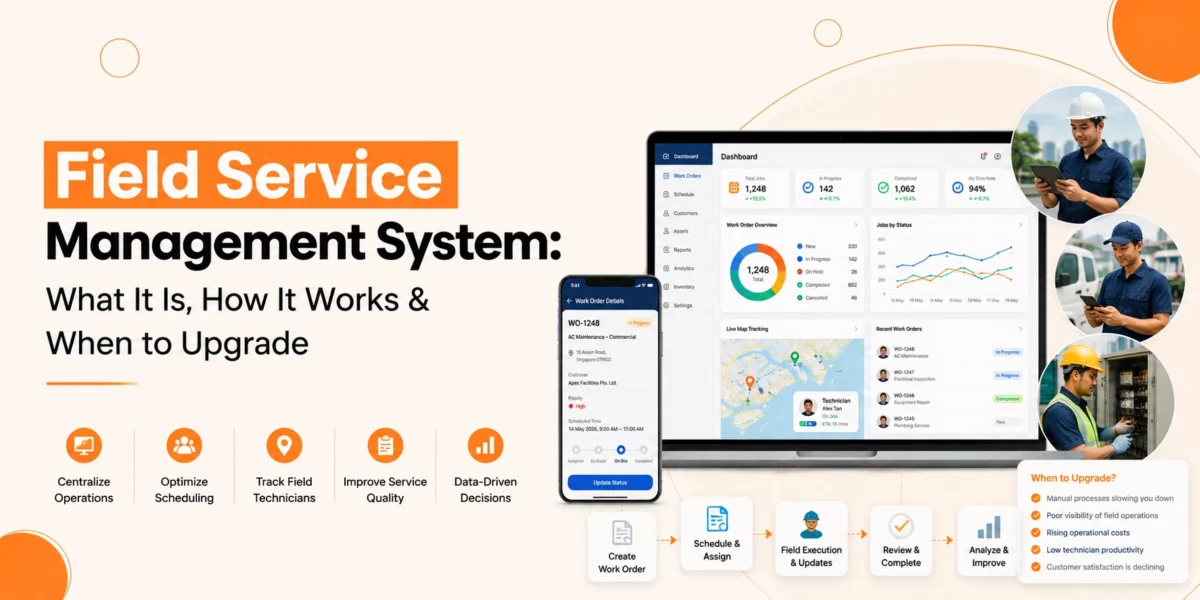
Field Service Management System: What It Is, How It Works & When to Upgrade

Field service teams are under more pressure than ever. Nowadays, customers expect quick responses, accurate arrival times, and first-time fixes. At the same time, service businesses must manage technicians, schedules, inventory, work orders, and customer communication across multiple locations.

Trying to handle all of this with spreadsheets, paper forms, emails, and disconnected tools can create delays, errors, and rising costs.

This is where a field service management system can make a difference.

A modern system helps service businesses organise field operations, improve productivity, and deliver a better customer experience. Whether you manage a small team or a growing workforce, understanding how these systems work can help you make better decisions for your business.

In this guide, we’ll explore what a field service management system is, how it works, its key benefits, and the signs that show it may be time to upgrade.

What Is a Field Service Management System?

A field service management system is a digital platform that helps businesses plan, manage, and track work performed outside the office or service centre. It brings together the key parts of field operations into one place, including:

  • Scheduling
  • Dispatching
  • Work order management
  • Technician tracking
  • Customer communication
  • Inventory management
  • Reporting and analytics

The business has established a direct objective that aims to support service teams in their work while delivering an excellent customer service experience. The FSM system serves as an operational management solution for businesses that perform equipment installation, repair, maintenance and inspection services.

Common industries include:

  • Utilities
  • Telecommunications
  • HVAC
  • Facilities management
  • Manufacturing
  • Medical equipment servicing
  • Property maintenance
  • Security systems

As customer expectations continue to rise, many organisations are moving from manual processes to a dedicated field service automation system.

Why Field Service Management Matters

Field service operations involve many moving parts. A single job may require:

  • A technician with specific skills
  • Available spare parts
  • Customer information
  • Travel planning
  • Compliance records
  • Service documentation

Without proper coordination, problems can occur quickly.

Common challenges include:

  • Missed appointments
  • Double bookings
  • Long response times
  • Incomplete job records
  • Poor communication
  • Repeat visits
  • Inventory shortages

An FSM system helps solve these issues by providing a central platform for managing field activities. Instead of working with separate tools, teams can access the information they need from one system.

How a Field Service Management System Works

To understand the value of an FSM platform, it helps to look at the typical service workflow.

Job Request Creation

The process often begins when a customer requests service. This request may come through:

  • Phone calls
  • Email
  • Online forms
  • Customer portals

The system records the request and creates a work order. Important details are stored, including:

  • Customer information
  • Asset details
  • Service history
  • Job requirements

This creates a complete record before work begins.

Scheduling and Planning

Scheduling is one of the most important functions of an FSM system. Service managers need to balance:

  • Technician availability
  • Skills and certifications
  • Location
  • Priority levels
  • Customer preferences

The system helps assign the right technician to the right job. This reduces scheduling conflicts and improves workforce utilisation.

Dispatching Technicians

Once a job is scheduled, the dispatcher sends the work order to the assigned technician. The technician receives information such as:

  • Job location
  • Customer details
  • Service instructions
  • Equipment information
  • Required parts

With access to accurate information before arriving on-site, technicians can prepare properly. This improves first-time fix rates and reduces repeat visits.

On-Site Service Delivery

When technicians arrive at the customer site, they can access job details from a mobile device.

They can:

  • View service history
  • Follow checklists
  • Record findings
  • Capture photos
  • Update work status
  • Collect customer signatures

This creates a clear and accurate record of the work performed.

Inventory and Parts Management

Many service jobs require replacement parts or consumables. A good field service management software platform helps track:

  • Stock levels
  • Part usage
  • Warehouse inventory
  • Vehicle inventory

Technicians can see whether parts are available before travelling to a job. This reduces delays and unnecessary return visits.

Job Completion and Reporting

Once the work is complete, the technician updates the work order. The system records:

  • Labour hours
  • Parts used
  • Job outcomes
  • Customer feedback

Managers can then review performance data and generate reports. This provides greater visibility into field operations.

What are the Features of Field Service Management Software

Different providers offer different capabilities, but most field service management software platforms include several core features.

Work Order Management

Work orders serve as the essential base which enables field service operations to operate effectively. A system helps businesses create, assign, track, and close work orders efficiently. This reduces paperwork and improves visibility.

Technician Scheduling

Service managers use scheduling tools to distribute their resources based on:

  • Availability
  • Skills
  • Workload
  • Location

The system distributes work assignments through its automated process, which assigns all team members responsibilities.

Mobile Access

Mobile functionality enables technicians to retrieve data while working in the field. The system enables staff members to make decisions at higher speeds while maintaining their communication channels.

Customer Communication

Customers want regular updates about their service requests. Many service management software platforms provide:

  • Appointment confirmations
  • Status updates
  • Arrival notifications
  • Service summaries

Better communication helps build trust and improve customer satisfaction.

Asset and Service History Tracking

Service teams often need access to previous maintenance records. An FSM system stores historical information such as:

  • Previous repairs
  • Inspection reports
  • Warranty details
  • Equipment specifications

This helps technicians diagnose problems more effectively.

Reporting and Analytics

Reporting tools provide insights into operational performance. Businesses can monitor:

  • Response times
  • Job completion rates
  • Technician productivity
  • First-time fix rates
  • Customer satisfaction

These insights support continuous improvement.

Also Read: Field Service Management Software in Singapore: Buyer’s Guide for Service Teams

What are the Advantages of an FSM Software

The value of an FSM software extends beyond operational efficiency. It can improve performance across the entire business.

Improved Productivity

Automated scheduling and work order management reduce administrative tasks. This allows teams to focus more time on service delivery.

Faster Response Times

The system operates with automated scheduling and work order management, which minimises all administrative activities. Teams obtain the capability to direct their complete focus toward delivering their services.

Better First-Time Fix Rates

When technicians have access to complete information and the right parts, they are more likely to resolve issues during the first visit.

This reduces costs and improves customer satisfaction.

Increased Visibility

Managers gain a clear view of:

  • Active jobs
  • Technician locations
  • Work progress
  • Resource allocation

This helps support informed decision-making.

Stronger Customer Experience

Customers value reliability and communication. A modern service management software solution helps businesses provide:

  • Accurate appointment times
  • Service updates
  • Faster issue resolution

These factors contribute to a positive service experience.

Reduced Operational Costs

Better scheduling, fewer repeat visits, and improved resource planning can help lower operating expenses. Over time, these savings can be significant.

When to Upgrade to an FSM System

Businesses begin their operations by performing manual work with fundamental tools that operate at basic levels.

The initial methods function correctly during startup phases, but they produce fresh problems when businesses start expanding.

Organisations that begin their operations with basic systems must learn when to move their FSM solutions to prevent operational breakdowns. The following list shows which signs appear most frequently.

Your Team Is Spending Too Much Time on Administration

The organisation experiences decreased operational efficiency because staff members dedicate their time to spreadsheet updates, paperwork management, and schedule coordination instead of their core responsibilities. The system requires less human intervention because it operates with automated systems, which decreases the need for staff members to work.

Scheduling Problems Are Increasing

The current system fails to operate effectively because it experiences frequent scheduling conflicts, technicians become unavailable, and appointments get missed. A dedicated system can provide greater control and visibility.

Customer Complaints Are Rising

Customers expect timely service and clear communication. The organisation needs to update its system because it receives frequent complaints about service delays and staff members who fail to show up for their appointments.

Business Growth Is Creating Complexity

Growth is positive, but it can expose weaknesses in manual systems. An FSM system for growing service businesses helps manage larger teams, higher job volumes, and expanding service areas.

Limited Access to Data

Many businesses struggle to track performance because information is stored across multiple systems. A central platform provides access to operational data in one place.

Technicians Lack Information in the Field

Field teams need access to accurate information while working on-site. If technicians rely on phone calls or paperwork to obtain details, service quality can suffer.

How to Choose the Right FSM Software Solutions

Not all FSM software solutions are the same. When evaluating options, businesses should focus on their operational needs. Important considerations include:

Ease of Use

The system should be simple for both office staff and technicians. Complicated software often leads to low adoption rates.

Mobile Functionality

Field teams need reliable access to information wherever they work. Strong mobile capabilities are essential.

Scalability

Choose a solution that can support future growth. This is particularly important for businesses planning to expand services or increase workforce size.

Reporting Capabilities

Access to meaningful performance data helps organisations improve efficiency and service quality.

Integration Potential

Many businesses use other operational systems. The ability to connect data across platforms can improve overall workflow efficiency.

What is the Future of Field Service Management

Field service operations continue to evolve. Businesses need to find clever methods that will enhance their service performance while keeping their operating expenses under control.

Field automation systems for modern businesses provide enhanced visibility, together with improved workforce management and optimised resource distribution.

Service organisations require solutions that enable them to respond quickly while maintaining stable operations, as their customers demand better service. Service operations will maintain their customer base as they grow.

Conclusion

Overall, A field service management system enables service businesses to organise their operations while tracking their fieldwork and enhancing their operational performance. Organisations achieve operational efficiency improvement through a single platform that merges scheduling and dispatching capabilities with work order management and inventory control, customer interaction and reporting functions.

FSM systems serve as the fundamental solution to enhance field operations because they address scheduling difficulties, growing service requirements and operational expansion needs.

The existing processes that use spreadsheets and paper records, and separate tools, need evaluation for FSM system technology replacement.

Businesses can use modern field service management software to establish their operational framework, which helps them expand their business while delivering better customer service and building strong client connections.

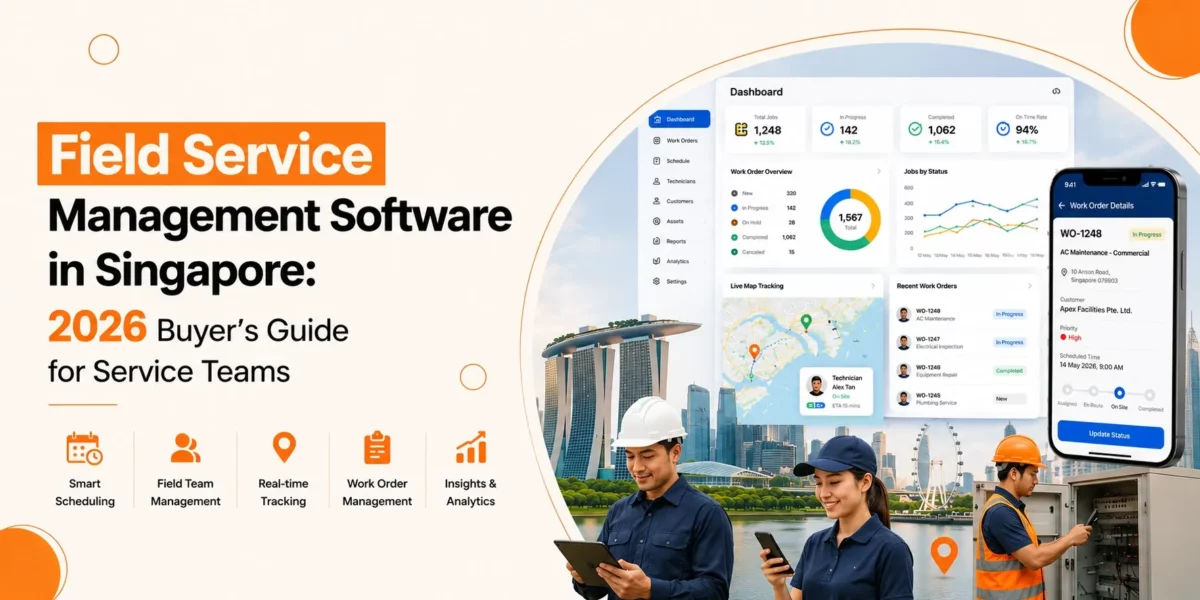
Field Service Management Software in Singapore: 2026 Buyer’s Guide for Service Teams

Field service management software helps service businesses manage scheduling, technicians, customer communication, reporting, and field operations through one central system.

Running a service business in Singapore is not easy. Nowadays, customers expect quick response times, clear updates, and reliable service. At the same time, service teams deal with traffic, labour shortages, rising costs, and tight schedules.

Field service scheduling software has become essential for various businesses because it enables them to handle their daily organisational responsibilities. The correct system enables teams to speed up their operations while decreasing their error rates through its combination of job distribution and technician monitoring capabilities.

The system delivers two major benefits because it enhances customer service experiences and helps organisations grow their business operations. In this guide, you will learn about how service teams in Singapore select their best field management software.

Why Service Teams in Singapore Need FSM Software in 2026

FSM Software helps Singapore’s service businesses improve efficiency, reduce delays, manage field teams better, and handle growing customer expectations.

Singapore businesses face strong competition and high customer expectations. Clients want faster service and clear communication. At the same time, companies must manage:

  • Limited manpower
  • Higher operating costs
  • Complex schedules
  • Compliance requirements
  • Growing customer demands

This is where the FSM System becomes important.

A modern system helps service teams complete more jobs with fewer delays. It also improves visibility across operations.

In 2026, many businesses in Singapore will focus on automation and digital workflows. Manual processes will continue to decline. Companies that still rely on spreadsheets and paper forms may struggle to keep up.

What are the Key Features Buyer Should Look For?

Businesses should look for scheduling tools, mobile access, reporting, customer management, and inventory tracking when choosing field service management software.

Not every system offers the same tools. Some focus on scheduling, while others support complete service operations. Below are the most important features to consider.

Job Scheduling and Dispatching

Scheduling is one of the main functions of field service scheduling software. Managers can assign jobs based on:

  • Technician location
  • Skills
  • Availability
  • Urgency
  • Job type

This helps reduce travel time and improves response speed. Good scheduling tools also allow quick changes when emergencies happen.

Mobile Access for Field Staff

Technicians need access to information while on-site. Mobile tools allow field teams to:

  • View job details
  • Update work status
  • Upload photos
  • Collect signatures
  • Complete reports

This supports better mobile workforce management in Singapore, especially for teams working across different locations.

Customer Management

A strong system stores customer records in one place. Teams can view:

  • Service history
  • Equipment details
  • Previous invoices
  • Notes from earlier visits

This improves customer support and reduces repeated questions.

Inventory and Parts Tracking

Service businesses often manage tools, spare parts, and equipment.

Inventory tracking helps teams know:

  • What parts are available
  • Which items are low in stock
  • What technicians carry in their vehicles

This prevents delays caused by missing parts.

Reporting and Analytics

Reports help managers understand business performance.

Useful reports include:

  • Job completion rates
  • Response times
  • Technician productivity
  • Customer satisfaction
  • Revenue tracking

Clear reporting supports better business decisions.

Also Read: What is Mobile Workforce Management Software?

How to Choose the Best Field Service Management Software in Singapore 2026

Businesses should prioritise ease of use, scalability, mobile performance, integrations, and security when selecting a Field Service Management System.

When searching for the best field service management software in Singapore 2026, businesses should focus on operational needs rather than trends.

The right system depends on company size, industry, and workflow complexity. Below are the key areas to evaluate.

Ease of Use

A system should be simple to learn. Because complicated software can slow adoption and create frustration among staff. Always look for clear navigation and straightforward workflows.

Scalability

Businesses grow over time. So, choose software that can support:

  • More users
  • More customers
  • Additional service locations
  • New workflows

This prevents costly migrations later.

Mobile Performance

Field technicians rely heavily on mobile devices. The system should work smoothly on phones and tablets with minimal loading issues. Also, offline access can help teams working in areas with weak connections.

Integration Options

Many businesses already use accounting or CRM systems. Good integration reduces duplicate work and improves data accuracy.

Security and Compliance

Service companies handle customer information daily. Strong security measures help protect sensitive data and support compliance requirements.

Affordable Pricing

Another important factor to consider is field service management software pricing in Singapore. Pricing can vary based on the number of users, required features, implementation requirements, and support options. Businesses should compare the total cost of ownership rather than focusing only on the initial subscription fee.

What Are the Implementation Challenges During FSM Adoption?

Businesses may face staff resistance, training issues, workflow problems, and data migration challenges during FSM implementation.

Business operations will improve through field service management software adoption, yet organisations need to handle various implementation difficulties. Staff members from offices and field teams need to take part in training sessions and planning activities for deployment success.

Organisations encounter their first operational problems because staff members continue to follow manual work procedures during their first implementation period. The new system will face resistance from technicians and dispatchers because they doubt its user-friendliness.

Here are some common challenges businesses face during implementation.

Staff Resistance to Change

Employees who have worked with paper forms or spreadsheets for many years may hesitate to switch to digital workflows.

Some technicians may worry that:

  • The software is too complex
  • Mobile tools will slow them down
  • New processes will increase the workload

Clear communication and proper training can help teams feel more comfortable during the transition.

Data Migration Problems

Moving customer records, job histories, and inventory data from old systems can take time.

Incorrect or incomplete data may lead to:

  • Scheduling errors
  • Missing customer information
  • Reporting issues

Businesses should clean and organise data before migration begins.

Incomplete Workflow Planning

Some companies adopt software without reviewing existing workflows first.

This can create confusion in areas such as:

  • Job approvals
  • Technician assignments
  • Service reporting
  • Invoice generation

Before implementation, businesses should define how each process will work inside the new system.

Training and Onboarding

Training is important for both office teams and field workers.

Dispatchers, managers, and technicians often use different features within the software. Each group may require separate onboarding sessions.

Simple training plans can help employees adapt faster and reduce operational disruptions.

Tips for a Smoother FSM Rollout

Businesses can improve implementation success by:

  • Starting with one department first
  • Testing workflows before full deployment
  • Setting clear operational goals
  • Gathering feedback from technicians
  • Providing ongoing support after launch

A phased approach often reduces pressure on staff and allows businesses to fix issues early.

Why Is Offline Mobile Access Important in Singapore?

Offline mobile access allows technicians to continue working even in areas with weak or unstable internet connections.

Strong mobile tools are essential for modern mobile workforce management in Singapore. However, internet access is not always stable in every work environment.

Technicians may work in:

  • Underground car parks
  • Industrial buildings
  • Construction sites
  • Remote service areas
  • Basement equipment rooms

In these locations, mobile signals can become weak or unavailable.

This is why offline mobile access is an important feature in FSM Software.

Why Offline Access Matters

Without offline capability, technicians may struggle to:

  • View job details
  • Update service status
  • Access customer records
  • Upload reports
  • Capture signatures

The system generates work delays because it prevents office staff from maintaining effective communication with their field teams.

The system maintains operational capabilities for technicians because it supports work functions when internet connectivity becomes unavailable.

The system retains updates on the device until it establishes a connection, which activates its automatic synchronisation process.

Benefits of Offline Mobile Access

Businesses using offline-enabled field management software can benefit from:

Better Productivity

Technicians can continue completing tasks without waiting for internet access.

Fewer Service Delays

Work continues smoothly even in low-connectivity areas.

More Accurate Reporting

Field staff can record updates immediately instead of relying on memory later.

Improved Customer Experience

Customers receive faster service without interruptions caused by technical issues.

What Buyers Should Look For

When evaluating field service scheduling software, businesses should check whether the mobile application supports:

  • Offline job access
  • Offline form submission
  • Automatic data syncing
  • Offline photo uploads
  • Secure local data storage

Reliable offline access can make a major difference for service teams working across different environments in Singapore.

What are the Different Industries that use FSM?

Many industries in Singapore use the FSM System to manage technicians, scheduling, and field operations.

Many sectors in Singapore use FSM daily.

HVAC and Air Conditioning

Technicians manage installations, repairs, and maintenance visits. Scheduling tools help reduce delays during peak periods.

Cleaning Services

Cleaning companies use systems to manage recurring jobs and staff deployment.

Security and Surveillance

Field teams often handle urgent repairs and maintenance requests along with real-time communication that improves response speed.

Telecommunications

Technicians manage installations and network maintenance across many locations.

Healthcare Equipment Services

Medical equipment requires regular servicing and compliance tracking. Digital records improve accuracy and accountability.

How Should Businesses Choose the Right FSM System?

Businesses should choose software based on operational needs, team size, workflow complexity, and business goals. Every service company has different needs. Before selecting a platform, businesses should review:

  • Team size
  • Service areas
  • Job complexity
  • Reporting needs
  • Budget
  • Existing workflows

Start by identifying operational problems first. Then look for software that clearly solves those issues. A good system should simplify work, not create extra steps.

Small and medium-sized businesses should also evaluate whether the solution meets their current operational needs without adding unnecessary complexity. Many providers now offer field management software for SMEs with flexible features that help smaller service teams improve scheduling, reporting, and workforce coordination while staying within budget.

Final Thoughts

Overall, the service industry in Singapore continues to change quickly. Organisations need to handle customer expectations together with their rising costs and their operational system demands. Service teams from the present time depend on field service management software because it functions as a vital operational tool.

The correct system delivers better scheduling capabilities together with improved communication systems, enhanced reporting features and complete workforce monitoring. The system provides businesses with two main advantages, which include improved customer service delivery and automated processes that decrease their required manual work.

The process of selecting a field management software solution for businesses needs proper strategic thinking, regardless of their operational scale.

In 2026, companies that invest in efficient service operations will establish themselves as market leaders who will achieve sustainable business growth. The service-based business sector in Singapore needs Field Management Software to reach operational excellence while maintaining customer confidence and protecting its market position in the current competitive environment.

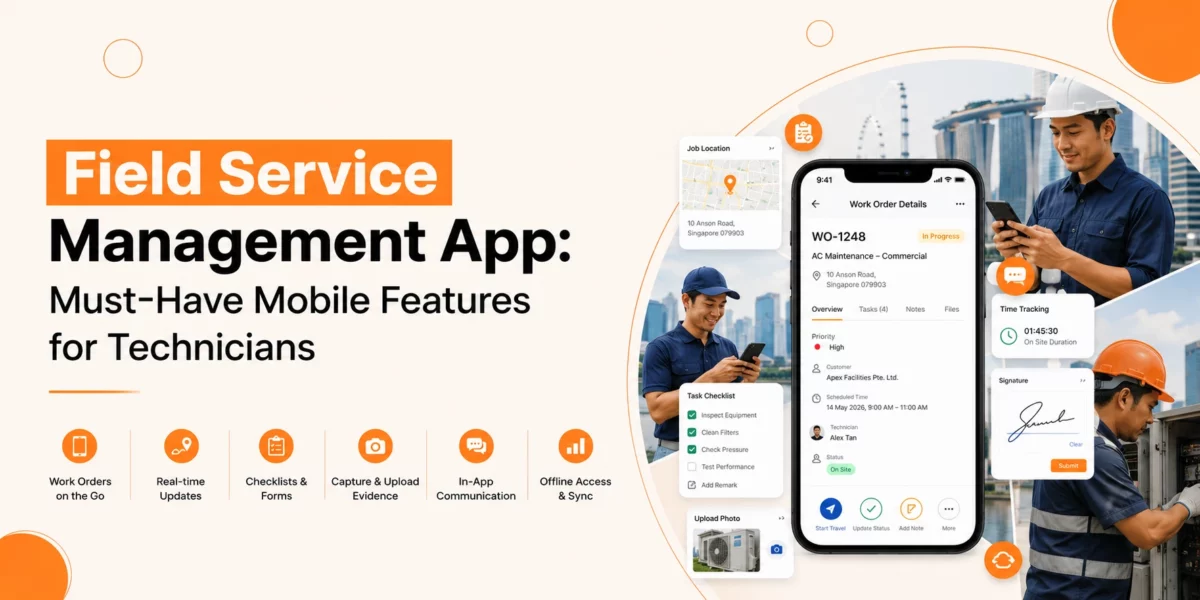
Field Service Management App: Must-Have Mobile Features for Technicians

Field teams no longer work with paper forms, phone calls, and manual schedules. Service businesses now rely on mobile tools to keep technicians connected, organised, and informed throughout the day. A modern field service management app helps technicians complete jobs faster, reduce errors, and improve customer service without returning to the office.

From job scheduling to digital invoices, mobile access has changed how field teams operate. Technicians can now receive updates, view job details, capture signatures, and report progress from one device.

But not every app meets the needs of field workers. Some lack offline support. Others fail to give real-time updates or easy navigation. The right solution should make daily work simpler, not harder.

In this guide, we will explore the must-have mobile features every field service team should expect from a reliable field service management mobile app.

Why Mobile Access Matters in Field Service Management

Field technicians spend most of their time away from the office. The workers spend their day travelling between customer sites, job locations, storage facilities and maintenance zones. Operations will experience delays because of missing information and slow communication, which produces negative effects on customer satisfaction.

A mobile-first system solves these issues by giving technicians access to critical data wherever they are.

Businesses can achieve better field service management through the development of strong mobile capabilities.

  • Businesses can assign their work tasks to employees at a faster pace.
  • Businesses need to reduce their paper usage because this practice enables them to cut their costs and achieve their sustainability targets.
  • The system enables technicians to reach customers at the earliest possible time.
  • The system provides real-time work monitoring, which allows staff members to observe all operations.
  • Users can contact customers at any time through the platform to deliver important information.
  • The system leads to higher first-time fix rates for maintenance tasks.

Customers want businesses to speed up their service delivery, while they want to receive straightforward information.

Technicians can use mobile tools to show up ready for work because these devices allow them to finish their tasks without experiencing any pointless delays.

Key Features Every Field Service Management App Should Include

Not all mobile tools support technicians in the same way. The best systems focus on speed, ease of use, and real-time access.

Below are the most important features every business should look for.

Real-Time Job Updates

One of the most valuable features in a field service management mobile app is live job tracking and updates.

Technicians should receive:

  • New assignments
  • Schedule changes
  • Customer notes
  • Priority alerts
  • Route updates

A strong mobile FSM app for job updates helps field teams respond quickly when plans change during the day.

Without mobile updates, technicians often rely on calls or text messages from dispatchers. This creates confusion and increases delays.

Live updates keep everyone aligned and reduce communication gaps between office staff and field workers.

Why It Matters

Real-time updates help technicians:

  • Reach jobs on time
  • Avoid missed appointments
  • Access the latest customer information
  • Reduce repeat visits

For service managers, this feature improves visibility across the workforce.

Also Read: Best Field Service Management App

Offline Access for Remote Work

Field technicians often work in locations with weak internet coverage. Basements, rural sites, construction areas, and large facilities can all affect connectivity.

An offline field service app allows technicians to continue working even without network access.

Technicians should still be able to:

  • View job details
  • Access customer records
  • Complete forms
  • Capture signatures
  • Add notes and images

Once the connection returns, the app should sync automatically.

Why Offline Support Is Essential

Without offline access, technicians may lose important information or delay updates until they regain service.

This creates:

  • incomplete records,
  • slower reporting,
  • and workflow interruptions.

Offline capability keeps operations running without disruption.

Smart Scheduling and Dispatching

A reliable field service scheduling app should help technicians manage their day without confusion.

Mobile scheduling tools allow technicians to:

  • View upcoming jobs
  • Check appointment times
  • Receive route directions
  • See emergency requests
  • Track changes instantly

This reduces the need for constant phone communication with dispatch teams.

Better Scheduling Improves Productivity

Technicians work more efficiently when schedules are clear and organised.

Good scheduling features help businesses:

  • reduce travel time,
  • avoid double bookings,
  • improve punctuality,
  • and increase completed jobs per day.

For busy field teams, scheduling accuracy has a direct impact on customer experience.

GPS and Route Navigation

Travel takes up a large part of a technician’s day. A mobile app with built-in navigation helps reduce wasted time on the road.

GPS tools can help technicians:

  • find customer locations,
  • avoid traffic delays,
  • and optimise travel routes.

Managers can also track technician movement and job progress in real time.

Benefits of GPS Features

GPS support improves:

  • arrival times,
  • scheduling accuracy,
  • fuel efficiency,
  • and overall productivity.

Customers also appreciate accurate arrival estimates and better communication.

Digital Work Orders and Forms

Paper forms slow down field operations. They also increase the risk of missing or damaged records.

A modern field service management mobile app should allow technicians to complete all forms digitally.

This includes:

  • work orders,
  • inspection reports,
  • checklists,
  • safety forms,
  • and service confirmations.

Digital records are easier to store, search, and share.

Why Digital Forms Matter

Digital forms improve accuracy and reduce paperwork.

Technicians can:

  • complete tasks faster,
  • upload information instantly,
  • and reduce manual errors.

Office teams also gain faster access to completed reports.

Photo and Video Uploads

Visual proof helps technicians explain completed work and document service conditions.

A mobile app should allow users to:

  • capture site photos,
  • upload videos,
  • attach images to reports,
  • and share files with office teams.

This feature supports better communication between technicians, managers, and customers.

Common Uses for Media Uploads

Technicians often use photos to:

  • show equipment damage,
  • confirm completed repairs,
  • document safety concerns,
  • or provide installation proof.

Images also help reduce disputes and improve service transparency.

Customer Information Access

Technicians need quick access to customer records before arriving on site.

A strong field service mobile app should provide:

  • customer contact details,
  • service history,
  • equipment records,
  • previous notes,
  • and warranty information.

Having this data available helps technicians arrive prepared.

Better Information Leads to Better Service

When technicians understand the customer’s history, they can:

  • diagnose issues faster,
  • avoid repeated questions,
  • and deliver more personalised service.

Customers notice when technicians arrive informed and ready.

Inventory and Parts Tracking

Field technicians often need tools, equipment, or replacement parts to complete jobs.

A mobile app with inventory tracking helps technicians:

  • check stock levels,
  • confirm part availability,
  • request replacements,
  • and record used items.

This prevents delays caused by missing parts.

Why Inventory Visibility Matters

Without inventory access, technicians may:

  • arrive without the correct equipment,
  • delay repairs,
  • or schedule return visits.

Real-time inventory tracking improves first-time fix rates and reduces downtime.

Mobile Invoicing and Payments

Many businesses now complete billing directly in the field.

A field service management app should support:

  • digital invoices,
  • payment collection,
  • service summaries,
  • and customer signatures.

This speeds up payment cycles and reduces paperwork.

Faster Payments Improve Cash Flow

Technicians can generate invoices immediately after completing a job.

Customers benefit from:

  • quicker transactions,
  • digital receipts,
  • and transparent billing.

Businesses also reduce delays caused by manual invoicing processes.

Push Notifications and Alerts

Technicians work in fast-moving environments. Mobile alerts help them stay informed throughout the day.

Notifications can include:

  • new assignments,
  • urgent schedule changes,
  • customer cancellations,
  • and safety updates.

This feature keeps technicians connected without constant calls from dispatchers.

Why Alerts Improve Operations

Push notifications help technicians react quickly to changes and avoid missing information.

This improves:

  • communication,
  • scheduling flexibility,
  • and response times.

Technician-Friendly Interface

Field workers need tools that are easy to use under pressure.

Complicated systems slow down work and increase frustration.

The best technician mobile app features focus on:

  • simple navigation,
  • fast loading times,
  • clear layouts,
  • and minimal steps.

Technicians should complete tasks quickly without searching through menus.

Ease of Use Affects Adoption

If an app feels difficult or confusing, technicians may avoid using it properly.

A clean interface improves:

  • user adoption,
  • training speed,
  • and overall productivity.

Simple design matters just as much as advanced functionality.

Time Tracking and Job Status Updates

Technicians should be able to update job progress directly from their mobile device.

Status updates may include:

  • job started,
  • work paused,
  • waiting for parts,
  • or job completed.

Time tracking also helps businesses monitor labour hours and workload distribution.

Better Visibility for Managers

Live job status updates help managers:

  • track progress,
  • identify delays,
  • and improve scheduling decisions.

Customers also receive more accurate service updates.

Safety and Compliance Features

Field service work often involves safety checks and compliance reporting.

Mobile apps should support:

  • digital safety forms,
  • inspection records,
  • compliance checklists,
  • and incident reporting.

This helps businesses maintain consistent safety standards across teams.

Why Safety Tracking Matters

Digital records improve accountability and simplify audits.

Technicians can complete required documentation directly on site without carrying paper forms.

Also Read: FSM Mobile Apps: Why They Matter & What to Look For

What Makes the Best Field Service Management App for Technicians?

The best field service management app for technicians should support daily work without creating extra complexity.

Technicians need tools that are:

  • fast,
  • reliable,
  • easy to use,
  • and available anywhere.

The most effective apps combine:

  • offline access,
  • scheduling,
  • customer records,
  • job updates,
  • and invoicing into one platform.

Businesses should focus on features that improve technician efficiency and customer experience rather than unnecessary complexity.

How Mobile Apps Improve Customer Satisfaction

Customers expect fast communication and reliable service.

Mobile tools help technicians:

  • arrive prepared,
  • provide accurate updates,
  • complete work faster,
  • and resolve issues during the first visit.

This creates a smoother customer experience from start to finish.

A strong field service management mobile app also improves communication between office teams and technicians, which reduces scheduling errors and missed appointments.

The system operates to produce an unbroken customer experience which extends across all service delivery stages. A powerful field service management mobile application enables better communication between office personnel and field technicians, which leads to fewer scheduling mistakes and missed service visits.

Satisfied customers are more likely to:

  • return,
  • leave positive reviews,
  • and recommend the business to others.

Final Thoughts

Overall, Service businesses need a modern field service management application because it enables them to operate at higher speeds while their technicians achieve better results and their customers receive enhanced service experiences.

Technicians can access their work assignments through mobile devices, which enable them to update their records and maintain team communication while performing their duties from anywhere they choose.

Features like:

  • offline access,
  • real-time job updates,
  • GPS tracking,
  • digital forms,
  • inventory visibility,
  • and mobile invoicing

Organisations can achieve shorter waiting times through their selection of appropriate field service mobile apps, which simultaneously boost their communication systems and enable technicians to finish more tasks by reducing their physical work requirements.

Also, organisations that allocate budget for field service management mobile apps will achieve better service delivery to customers who need quick service and dependable service throughout each day.

AI & Predictive Maintenance in FSM: Preparing for the Future

Field service now extends beyond its original purpose of solving problems because it focuses on preventing problems from occurring. It is about preventing them. Nowadays, organisations are looking to decrease operational interruptions while they work toward improved scheduling methods and enhanced operational monitoring systems.

AI for field service drives this transformation by allowing teams to extract useful information from their data, which improves their decision-making abilities. The system responds quickly while it makes operations more efficient and prevents unexpected equipment breakdowns.

The equipment management system now operates through predictive maintenance, which uses data to modify its operational approaches. Businesses can prevent expensive system failures by taking action right away instead of waiting for breakdowns to occur.

In this blog, we will explore the future development of field service management AI through predictive strategies and demonstrate how businesses should get ready for these changes.

The Evolution of Field Service Management

The Reactive Approach

Field service once relied on a reactive model. A fault would occur, and a technician would be sent to fix it, which often caused delays and unexpected downtime. That’s why the costs were higher, because issues were handled only after they became serious.

The Shift to Scheduled Maintenance

To improve this, businesses introduced scheduled maintenance. Equipment was checked at fixed intervals, regardless of its actual condition. This reduced some risks but created new challenges as teams sometimes carried out unnecessary work while some issues still went unnoticed between inspections.

The Rise of Proactive Service

Today, field service focuses on a proactive approach. Teams aim to identify issues before they lead to failure.

Maintenance is planned based on real equipment conditions, which reduces downtime and improves overall efficiency.

The Role of Field Service Management AI

This shift is supported by field service management AI. It analyses data and provides useful insights. This helps teams make better decisions and manage service operations with greater accuracy.

Read Also: How AI is Revolutionising Field Service Management: Smarter Operations, Happier Customers

Understanding Predictive Maintenance

What Makes It Different

Predictive maintenance uses real-time and historical data to detect early signs of failure. It focuses on actual equipment condition rather than fixed schedules. This approach ensures that maintenance happens:

  • Only when needed
  • Before breakdowns occur

Predictive Maintenance Using AI

Predictive maintenance using AI works by analysing patterns in equipment data. The process includes:

Data Collection

Sensors gather information such as temperature, vibration, and pressure.

Data Analysis

Systems study this data to identify unusual patterns or trends.

Prediction and Action

When a risk is detected, the system alerts the team. A service task can be scheduled in advance. This method reduces uncertainty and improves reliability.

Why AI for Field Service Is Essential

Growing Complexity in Operations

The current operational framework of field services has developed into a more intricate system than what existed in previous times. Teams handle numerous assets across various locations while processing their daily service requests.

The system becomes more difficult to manage because of its wide scale, which also creates longer waiting periods and more frequent operational mistakes. The manual systems fail to meet operational requirements, which results in delayed responses and unaddressed problems.

The Role of AI for Field Service

The field service operational complexity reaches its peak because AI systems monitor all incoming activities.

Also, the system processes large amounts of data at high speeds, which enables teams to identify patterns while detecting risks during their early stages.

The system provides fast decision-making support, which helps users achieve better results when they need to handle urgent service requests.

Moving Towards Precision

Businesses can reduce their guesswork through improved data quality and a better understanding of their information.

The team members achieve better task planning abilities while their issue response speed improves and their operational processes become more streamlined.

The organisation experiences better operational performance through this transition, which produces better dependability in their service delivery.

Core Benefits of Predictive Maintenance

Reduced Downtime

Unexpected failures disrupt operations. They lead to delays and loss of revenue. With predictive maintenance, issues are resolved before they cause disruption.

Cost Efficiency

Emergency repairs often require urgent resources, which also increase labour and travel costs. Predictive strategies reduce these sudden expenses and improve cost control.

Extended Asset Life

Early detection prevents severe damage. Equipment stays in better condition for longer.

Better Resource Planning

Service teams can plan work based on actual needs. This improves efficiency and reduces wasted effort.

AI Automation for Field Service

Streamlining Daily Operations

Service teams handle their daily workload through various standard operational activities, which they must perform. The process requires creating jobs while maintaining their status, producing reports, and staying in touch with customers. The process of manual task management consumes hours while people face obstacles that cause them to miss vital steps in their work.

The field service operation benefits from AI automation because the system performs regular tasks according to its planned structure, which reduces operational complexity. Also, the system generates work orders automatically when it identifies an issue, and it tracks job progress through instant updates while it sends messages to both field personnel and service users.

Additionally, the system enables teams to achieve faster response times while they maintain their operational order. With it, the process enables technicians to spend their time on essential service tasks instead of handling administrative work. The operation runs with better efficiency because of this system.

Improving Workflow Consistency

Field service operations need to maintain consistent operational standards for their work activities. However, organisations experience rising mistakes and falling service quality when their operational systems diverge from each other.

To address this, AI for field service ensures that each task follows a defined workflow. The system records all activities, helping staff understand their roles while also creating clear lines of responsibility.

As a result, teams that work with structured workflows will maintain their operational stability while they provide dependable service to their customers for all their work tasks.

AI Tools for Technician Scheduling

Smarter Job Allocation

Field service scheduling requires businesses to handle a complex operational system. The system requires multiple operational components to function at their scheduled times. Managers need to consider technician skills, current location, and job priority before assigning any task. Manual execution of this process leads to delayed results, which produce ineffective decision-making.

The AI scheduling system for technicians solves this problem by running complete analyses of all relevant factors that appear in the scheduling process. The system uses data analysis to allocate work assignments to technicians who possess the right abilities for each task.

Moreover, the system prevents site confusion by delivering the correct personnel to the correct site location. The system shortens travel distances because it stops staff members from making useless travel journeys between locations. Consequently, the system enables teams to finish their work activities at a better speed while sustaining their current level of service excellence.

Real-Time Scheduling Adjustments

The conditions that occur in the field become unstable during fast changes. The work schedule needs more time than planned because an emergency request arrived without warning. The present scheduling system cannot adapt to these emerging circumstances.

However, smart systems powered by AI for field service respond to these shifts in real time. The system handles its operations by changing its routes, assigning new tasks to personnel, and creating updated work schedules.

As a result, the organisation maintains smooth operations through this system, which enables teams to complete their planned work activities during their scheduled work hours.

The Role of Field Service Management AI

Centralised Operations

Field service management systems gather all service-related data into a singular database, which operates as a centralised system. The system provides managers with an immediate overview of their daily operations, which they can access without switching between different systems.

Teams have the ability to track their current work assignments while tracking their field technicians and keeping an eye on their equipment status through their real-time monitoring system.

The system provides complete visibility, which helps users prevent both confusion and delays in their operations. Managers can respond quickly to changes and make informed decisions based on accurate information.

Data-Driven Insights

Data now plays a key role in guiding service operations. Systems use stored information to create better decision-making processes instead of maintaining basic storage functions.

The process results in better forecasting abilities, improved planning methods, and enhanced performance monitoring systems.

Teams have developed the ability to identify patterns, which enables them to predict service needs, and they can modify their plans through enhanced assurance.

Enhanced Customer Experience

Customers expect fast and reliable service. Smart systems improve communication by sharing accurate arrival times and providing real-time updates.

The system enables proper technician selection through its ability to analyse incoming requests and provide staff members with essential information.

The system helps prevent patients from needing to come back by sending the correct technician who carries all the necessary details. The process creates an improved service system that establishes customer confidence through regular trust-building experiences.

Business Impact of Predictive Maintenance

Operational Efficiency

Efficient systems allow businesses to handle more work without increasing resources.

Improved Service Quality

Fewer breakdowns mean better service delivery. This strengthens customer relationships.

Competitive Advantage

Businesses that adopt predictive strategies can respond faster and perform better than competitors.

The Future of AI in Field Service Management

Predictive Maintenance Using AI

AI-based predictive maintenance systems will become more important when systems achieve better performance through faster operations and enhanced precision. Organisations will obtain better equipment health information through their improved data processing abilities and their enhanced system connectivity.

Teams can identify risks at an early stage, which enables them to take preventive measures before actual failures happen. The system will achieve operational stability while reducing downtime occurrences, and it will develop into a system that provides better maintenance scheduling accuracy with each passing day.

AI Automation for Field Service

AI automation for field service will spread to all fundamental business activities, which will decrease the amount of work that needs to be done manually. The process of creating jobs, updating them, and generating reports will become more efficient through this system.

The system will create better team cooperation, which will produce uninterrupted operational processes. Technicians need to perform their tasks because they generate better service results through their direct customer work, which results in fewer mistakes and standardised field operation results.

AI Tools for Technician Scheduling

AI tools for technician scheduling will continue to evolve, making planning more accurate and efficient. The systems will distribute work assignments through their analysis of customer needs, together with staff capabilities and their current positions.

The system will improve its route planning capabilities while continuously updating its scheduling system through instant responses to operational changes.

The system will decrease travel distances while it speeds up emergency responses, and it will match each task with the appropriate technician, which results in improved operational performance and customer satisfaction.

Read Also: Is AI the Future of Field Service Management?

Conclusion

Overall, Field service is entering a new phase where organisations now work proactively instead of their previous reactive approach to business operations. Also, the field service AI system enables organisations to make better choices while gaining better operational command.

The field service management AI system, it provides better operational control through improved visibility, which boosts organisational efficiency. Predictive maintenance reduces downtime and supports long-term performance.

The organisations that take action today will build better future readiness. The team needs to establish its service foundation through data analysis and automation processes, together with strategic planning methods.

The transition has started its progress. The next step is to embrace it with a clear and practical approach.

Best Practices for Sustainable & Customer-Centric Field Service in 2026

Field service operations have faced rapid transformations over the last few years. Nowadays, customers expect fast assistance together with direct communication and they want their entire interaction to remain flawless. Organisations need to handle rising environmental sustainability needs while reducing their operational waste output.

Recent research indicates that customers base their purchasing decisions equally on product quality and service quality because more than 70% of buyers value service excellence at the same level as product quality, and almost 60% of buyers select businesses that support sustainability initiatives. With it, the industry faces a major transformation that will modify all field service operations through 2026.

Also, Field service management needs to follow best practices at this stage. Organisations need to move beyond focusing only on speed and cost because these elements are no longer enough.

The guide explains which operational elements will change because of these modifications.

What Sustainable and Customer-Centric Field Service Means

Sustainable Field Service

The core of sustainable field service operation depends on establishing operational methods that decrease environmental damage while maintaining operational efficiency. The process requires organisations to reduce their environmental footprint while advancing their operational systems for work execution and delivery. The process requires organisations to decrease their unnecessary site visits, while engineers must create better routing plans that reduce fuel consumption during their daily work activities. The process needs material handling systems because these systems help organisations minimise their waste production. The modifications enable teams to operate with better environmental conditions and reduced costs while maintaining their service delivery speed.

Customer-Centric Field Service

The customer-centric field service framework establishes customer needs as the primary factor that should direct every business choice. The system needs a straightforward service process that delivers dependable results through an easy-to-understand system. Customers need a straightforward booking process with regular status updates and absolute confidence that trained technicians will handle their problems with speed. The entire process needs to reduce customer work at every stage.

The Key Idea

Sustainability and customer focus work best together. The operation reaches its highest quality service levels through planned work, which enables them to operate at their best operational capacity.

Why We Should Follow Best Practices?

Improve Service Consistency

Best practices establish an unambiguous operational system that maintains continuous, reliable performance. The system maintains identical processing standards for every assignment that any staff member can handle.

The service quality differences between providers decrease, which enables customers to build trust with their service providers. The customer-centric field service framework depends on consistency because customers want identical service quality during every interaction.

Reduce Cost and Waste

Teams experience ongoing work interruptions together with postponed task completion and inefficient resource allocation, because they lack proper organisational systems. Best practices help reduce errors, improve planning, and limit unnecessary travel.

Organisations can achieve their sustainable field service objectives through this system, which decreases fuel consumption and waste production while enhancing operational performance.

Enhance Customer Experience

Customers value fast, smooth, and predictable service. Best practices enable organisations to decrease response time while they improve both their communication methods and their ability to resolve problems.

The result creates fewer customer complaints, which produces better customer satisfaction numbers. The system improves customer-focused field service operations because customers need to do less work.

Support Long-Term Growth

Field service management teams that follow best practices will achieve operational growth through proper scaling methods, which maintain their existing service quality standards. The system establishes a fundamental base that enables business expansion while keeping operational efficiency and customer service quality at their current levels.

Read Also: Best Practices & Tips For Field Service Management

Core Field Service Management Best Practices for 2026

Let’s break down the most important field service management best practices for modern operations.

Plan Jobs with Precision

The lack of proper planning creates multiple problems because it results in postponed work and workers must return to the site, while drivers need to drive extra miles, which leads to wasted fuel. A well-planned job ensures the right technician is assigned based on skill and location.

The process requires technicians to combine work orders from nearby locations, and they must bring all required components when they arrive at the site.

The method helps technicians reduce their travel duration so that they can solve the problem during their first visit. The system supports field service methods because it helps reduce unnecessary service visits.

Focus on First-Time Fix Rates

The process of repeating visits leads to rising expenses, while it generates environmental pollution through increased emissions.

The organisation needs to concentrate on enhancing first-time fix rates because this should represent its highest strategic priority. Teams need to send complete job information to technicians before their visit and technicians must have all necessary equipment, while staff should keep their knowledge database organised.

Business customers want quick solutions, so eco-friendly FSM tips will help them reduce their repeat visits while creating better customer satisfaction.

Use Smart Scheduling

Customers want more control over their time. Smart scheduling allows businesses to offer clear time windows, real-time updates, and simple rescheduling options.

The system decreases appointment cancellations while enhancing customer service interactions. The system operates as a fundamental element that supports customer-focused field service management software to establish customer trust.

Train Technicians Beyond Technical Skills

The ability to perform technical work stands as an insufficient requirement. Technicians need to deliver direct communication messages while showing their ability to solve problems right away, and they need to respect the personal space of their customers.

The way a technician interacts on-site has a direct impact on the customer experience. The development of service abilities leads to the creation of positive customer experiences, which leave enduring effects on businesses.

Reduce Travel and Emissions

Travel stands as the main culprit that creates waste during field service operations. Businesses can reduce this by clustering jobs by location, avoiding repeat visits, and using remote support when possible. These field service practices focus on sustainability through their ability to decrease operational expenses.

Improve Communication at Every Step

Customers dislike uncertainty. The process of keeping patients informed throughout their entire visit period leads to better patient satisfaction and increased staff confidence.

Field service organisations need to understand customer needs through direct communication because this approach helps them reduce customer frustration.

Sustainable Field Service Strategies That Deliver Results

Let’s look deeper at practical ways to build a sustainable operation.

Reduce Repeat Visits

Repeat visits are one of the biggest inefficiencies.

They increase:

  • Fuel use
  • Labour costs
  • Customer frustration

Fixing issues in one visit is one of the strongest eco-friendly FSM tips.

Use Remote Support Where Possible

Not every issue needs a site visit.

Remote support can:

  • Solve simple problems
  • Guide customers through fixes
  • Reduce travel

This supports both sustainability and customer convenience.

Manage Inventory Wisely

Poor inventory leads to delays and extra trips.

Good practice includes:

  • Keeping common parts ready
  • Tracking usage patterns
  • Avoiding overstock

This reduces waste and supports field service.

Encourage Responsible Work Habits

Small actions add up. Encourage teams to:

  • Reduce paper use
  • Limit idle time
  • Handle parts with care

These habits form the base of strong, sustainable field service strategies.

Building a Customer-Centric Field Service Framework

A strong customer-centric field service framework focuses on the full journey.

Make Booking Simple

Customers should not struggle to book a service.

Offer:

  • Clear options
  • Fast confirmation
  • Flexible time slots

A smooth start sets the tone for the whole experience.

Provide Clear Time Windows

Waiting all day is no longer acceptable.

Give:

  • Accurate arrival windows
  • Updates if plans change

This shows respect for the customer’s time.

Keep Customers Informed

Silence creates doubt.

Keep customers updated with:

  • Job status
  • Technician arrival
  • Work progress

This is a key part of customer-centric field service.

Deliver Consistent Service Quality

Customers expect the same level of service every time.

To achieve this:

  • Standardise processes
  • Train teams regularly
  • Monitor performance

Consistency builds trust.

Ask for Feedback and Act on It

Feedback helps you improve.

Ask simple questions:

  • Was the issue fixed?
  • Was the visit smooth?

Use this data to refine your field service management best practices.

Eco-Friendly FSM Tips That Also Improve Efficiency

Sustainability does not have to increase cost. In many cases, it reduces it.

Below are practical, eco-friendly FSM tips that deliver both benefits.

Optimise Routes

Better routes mean:

  • Less fuel
  • Less time on the road
  • More jobs completed

This is one of the easiest wins.

Digitise Workflows

Paper-based processes create waste and slow things down.

Move to digital records:

  • Job notes
  • Service reports
  • Customer signatures

This supports sustainable field service and improves speed.

Maintain Equipment Properly

Well-maintained tools:

  • Last longer
  • Perform better
  • Reduce replacement waste

This is a simple but often ignored step.

Reduce Idle Time

Vehicles left running waste fuel.

Encourage teams to:

  • Switch off engines when parked
  • Plan breaks around jobs

This small change supports sustainable field service strategies.

What Success Looks Like in 2026

A strong field service operation in 2026 will:

  • Fix most issues in one visit
  • Keep customers informed at all times
  • Reduce travel and waste
  • Train technicians in both skill and service
  • Follow clear, sustainable field service strategies

It will also use a clear customer-centric field service framework to guide every step.

Read Also: Utilise the Best Practices for Streamlining Field Operations

Conclusion

Overall, Field service operations will transform their task execution methods by 2026 because they need to achieve more than simple task completion. The process requires organisations to deliver appropriate services while effectively managing their resources. Organisations need to reach a balance among operational speed, product quality, and environmental sustainability to maintain their market position.

Teams that adopt field service management best practices will achieve better operational results through their ability to reduce service calls and their ability to optimise their scheduling activities, which leads to faster completion times. With it, allow businesses to achieve reduced expenses through sustainable field service operations, which maintain their service quality while minimising waste generation.

The customer-centric approach in field service operations creates systems that deliver dependable and straightforward experiences through every customer interaction. Organisations develop service models that generate mutual advantages for their customers and business operations through the integration of these components.

The future of field service requires organisations to work smarter while they maintain high standards of care and consistency in their operations.

Utilities Mobile Workforce Management Solutions: Driving Efficiency

Nowadays, the utility sector operators face continuous difficulties when they need to handle their field teams. Organisations must handle their scheduling duties together with their equipment management responsibilities and their customer service needs. The existing methods, which use spreadsheets, manual dispatch, and telephone communication, lead to both extended time requirements and numerous mistakes in their operations.

Utilities mobile workforce management solutions become important at this stage to solve these operational challenges. The system allows complete field operation visibility while it enhances operational procedures, which enable staff to achieve better performance in their daily work tasks. The solutions link field teams with back-office operations and operational systems, resulting in better work output and steady delivery of services.

In this guide, you will explore all major utilities mobile workforce management solution features together with their advantages, recommended application methods, and more.

What Are Utilities Mobile Workforce Management Solutions?

The utility sector operates field personnel management through their utilities mobile workforce management systems, which also track their tasks and utility assets.

The system offers a single platform that enables users to track their work progress while scheduling their tasks and creating instant reports.

The operational tools serve as software programs that function alongside their operational frameworks to handle regular business activities, team operations, and customer support delivery.

The system handles all maintenance needs, including both standard upkeep and urgent repair requirements.

These solutions offer teams visibility into their operations, which helps them stop delays and errors while they finish their work efficiently.

Key functions include:

  • Tracking field staff locations and activities
  • Scheduling jobs based on priority and capacity
  • Monitoring performance and service delivery
  • Collecting data on completed tasks for reporting and compliance

Why Utilities Mobile Workforce Management Solutions Matter

Utilities rely on timely and accurate service. Without proper management, delays can cause dissatisfaction and operational inefficiencies. Utilities mobile workforce management solutions address this by providing tools to:

Improve Workforce Productivity

Staff members who work in the field avoid long travel times and do not have to wait for directions before starting their work.

Scheduling tools optimise routes, which helps technicians reach their work locations at faster speeds.

Teams that receive specific assignments and appropriate resources will achieve better results within their standard work period.

Enhance Customer Service

Customers need organisations to deliver fast updates alongside effective solutions to their problems.

Mobile workforce management solutions enable companies to send clients notifications which include technician arrival times, progress updates, and job completion status.

Accurate tracking systems enable businesses to maintain customer happiness, which eventually leads to customer loyalty.

Reduce Operational Costs

The solutions work to lower business expenses through their ability to decrease fuel consumption, shorten travel distances, and reduce waiting times.

The managers need to distribute their resources properly because each field agent must reach their maximum working potential.

Core Features of Mobile Workforce Management Solutions for Utilities

Utility Workforce Scheduling Tools

The utility sector depends on efficient scheduling as its operational base for conducting successful field operations. Managers in utility workforce scheduling systems can assign work assignments to specific staff members who possess suitable skills and reside in appropriate locations and have available working hours.

The system operates through automated allocation tools, which protect every task from being either forgotten or duplicated. Managers can achieve better productivity results through their work distribution system because they handle emergency work first and then distribute tasks evenly to prevent staff exhaustion.

The system operates through automated schedules, which stop people from making mistakes while keeping work flowing properly with no responsibility mix-ups. The scheduling tools provide supervisors with emergency management capabilities by enabling them to create new schedules for weather disruptions, unexpected customer requests, and emergency situations, which protect their service operations from any possible interruption.

The strategic scheduling system minimises operational downtime while it boosts team productivity, which leads to higher overall organisational performance.

Real-Time Tracking and Reporting

Utility companies need to track their field workers because they operate multiple locations and maintain various team operations. The system provides managers with real-time tracking and reporting tools, which enable them to monitor progress continuously without needing to depend on phone updates or manual reporting.

Field staff members can immediately update their task progress through mobile devices, which enables supervisors to monitor their current work accurately.

The system enables fast detection of process blockages, unexpected problems, and time-consuming delays. Managers have the authority to change routes, and they can give new assignments to their staff members and offer direction that helps their groups complete their tasks on schedule.

Organisations gain better transparency through this system, which enables their staff members to track their work progress. Employees must maintain their scheduled work times while delivering quality service because management monitors their progress checkpoints.

Task and Work Order Management

The operational success of field work depends on correct task and work order management systems, which distribute work assignments properly to all team members.

Workforce management software enables teams to view complete job details, which show all project requirements together with their assigned importance and scheduled completion dates.

The system allows field workers to record their finished tasks, while they can upload pictures and create reports which stay within the system. The system provides all stakeholders, including managers and clients, with up-to-date data, which prevents any form of communication errors.

The system provides instant updates, which allow users to report equipment failures and dangerous conditions that show up at their work locations.

Organisations achieve shorter response times through centralised work order management, which enables better team coordination and results in improved service delivery trustworthiness.

Asset and Equipment Management

Utilities often manage complex assets, including pipelines, meters, transformers, and vehicles. Asset and equipment management features track usage, schedule routine maintenance, and maintain compliance records.

This prevents equipment downtime and ensures safety standards are consistently met. Field workers can report asset conditions in real time, allowing for proactive maintenance rather than reactive repairs.

Managers gain insights into resource allocation, usage patterns, and lifespan projections, supporting cost efficiency and operational planning.

Analytics and Performance Insights

The field operations data collection process generates extensive information which reveals how employees work, how services operate, and what recurring problems exist. Managers use analytics and performance insights to identify emerging patterns that help them assess worker output and discover specific areas that require improvement.

Organisations can use predictive analytics to forecast their future work requirements and resource needs, but reports provide useful data that helps organisations create their strategic plans.

The gathered information leads to improved operational performance while companies achieve better scheduling and maintain excellent service for every utility operation.

Benefits of Utilities Mobile Workforce Management Solutions

Streamlined Operations

Centralised tools connect scheduling systems with asset management software and reporting solutions through a single interface. Teams switch their time from manual coordination to actual task execution.

Improved Accountability

The system records every task that team members perform, which enables managers to track their work activities.

The system allows managers to monitor their staff members’ finished assignments, together with their compliance with rules and their speed of answering questions.

Better Communication

Field teams and back-office staff stay connected through immediate updates and built-in messaging systems, which enable them to maintain continuous communication.

The system enables quick resolution of queries while providing immediate escalation options for pressing problems.

Enhanced Decision Making

Workforce data analysis allows businesses to develop superior plans that optimise resource distribution and enhance emergency response operations and infrastructure building for the future.

Scalability for Growing Operations

The growing workforce needs mobile solutions which should support additional staff members, expanded service areas, and new service offerings while keeping business operations intact.

Best Practices for Implementing Mobile Workforce Management

Start with Clear Objectives

The system requires identification of main operational challenges, which include its poor scheduling capabilities, its slow response times, and its problem with asset tracking.

The solution needs to start with solving these particular issues that exist at the beginning.

Train Field Staff Thoroughly

The correct use of tools by people becomes necessary because all tools lose their value when users handle them incorrectly.

Field teams need to learn about task updates, issue reporting, and mobile interface operation through specific training sessions.

Integrate with Existing Systems

Workforce solutions need to establish connections with customer databases, billing systems, and maintenance logs for proper operation.

The process of integration helps organisations avoid duplicate work while providing better data precision.

Monitor and Iterate

Performance metrics, together with feedback, need to be reviewed at regular intervals.

The system needs to optimise its operational effectiveness through changes that will affect both work systems, scheduling methods, and reporting systems.

Focus on User Experience

The design should maintain basic operation through its simple interface. The field team needs to update their work assignments, while they should access their scheduled work and vital operational data through an easy-to-use system.

Use Cases of Mobile Workforce Management Solutions

Emergency Repairs

In case of outages or leaks, teams can be dispatched instantly. Managers view real-time locations and assign the closest available personnel, reducing response time.

Routine Maintenance

Scheduled inspections of meters, pipelines, or electrical equipment can be efficiently assigned and tracked, ensuring no asset is overlooked.

Customer Service Management

Technicians can update service completion, upload photos, and collect feedback, improving transparency and accountability.

Compliance and Reporting

Field reports are standardised and automatically stored, ensuring regulatory compliance and accurate documentation.

Choosing the Right Utilities Mobile Workforce Management Solution

Selecting the ideal utilities mobile workforce management solution requires careful consideration of multiple factors. Making the right choice ensures efficient field operations, improved customer service, and reduced operational overhead.

Scalability

Evaluate whether the solution can grow with your workforce. As teams expand, the system should handle additional users, locations, and service types without slowing down or becoming complicated. Scalable solutions prevent the need for costly replacements as your operations grow.

Real-Time Tracking and Reporting

Ensure the solution provides accurate real-time updates on field personnel and task progress. This capability allows managers to monitor operations, identify bottlenecks, and make immediate adjustments to maintain productivity.

Integration Options

Check whether the system integrates seamlessly with existing tools such as billing software, asset management platforms, and CRM systems. Integration reduces duplicated work and improves operational efficiency.

Ease of Use and Data Security

Confirm that field personnel can navigate the system easily. Additionally, ensure the platform maintains high data security standards to protect sensitive operational information.

By focusing on these criteria, utility companies can choose solutions that optimise performance, improve workforce coordination, and maintain safe, reliable operations.

Also Read: What Is Mobile Workforce Management?

Conclusion

Overall, Utilities mobile workforce management solutions are essential for modern utility companies. They streamline scheduling, improve accountability, and allow field teams to operate efficiently.

With tools such as utility scheduling tools, mobile solutions for utility teams, or utility field workforce apps, productivity can be enhanced, costs can be reduced, and timely service delivery can be ensured. Also, companies can benefit from real-time tracking, automated work order management, and integrated analytics to make better decisions and maintain high service standards.

By implementing these solutions with clear objectives, proper training, and integration into existing systems, utility providers can optimise field operations and deliver consistent value to customers.

img
img
*50% Grant

GenicTeams - Project Management Software

From Business Thrust Pte Ltd